LL Repost: Faster Avatar Loading on the Horizon

Faster Avatar Loading on the Horizon

by Community Manager Linden Lab on ‎05-29-2013 09:54 AM


We’ve been working hard on some major changes to Second Life’s Viewer and back-end infrastructure to improve the Second Life experience for all users. Today, we’re pleased to share an update on Project Shining – an initiative that will make avatars load and rez more quickly and reliably.

We’ve tested changing of outfits, avatar swapping, and initial avatar loading into worlds, and our tests showed performance gains across the board. Bottom line, Second Life users will experience less time in “clouded” or untextured avatar states and/or completely failed bakes that require relogs. Check out this video for more about the project.

http://www.youtube.com/watch?feature=player_embedded&v=jwglL3VXI80

Project Sunshine is rolling out in three steps:

1) A required Viewer update, out now! The official Second Life Viewer (version 3.5.1 and later) includes important updates you’ll need to enjoy the benefits of Project Sunshine, so update today if you haven’t yet.  Actively updated Third Party Viewers also already have Sunshine-enabled versions available.

2) A server-side update, rolling out soon. It’s at this point that you’ll begin to notice significant improvements in avatar and object load times and reliability. But if you haven’t updated your Viewer, avatars won’t look right to you when we roll out the server update, so seriously, update now!

3) A second Viewer update, released after the server-side improvements are rolled out. As long as you have the Viewer 3.5.1 or later (available now), avatars won’t look wrong for you, but this second Viewer update will be needed to get the full benefits of Project Sunshine.

Get on your way to a better, faster, and more reliable Second Life experience and update to the latest Viewer today!


Tech Tips and Advice- The Blue Screen of Death and Computer Overheating.

Hello ZoHa Islands!

I have received many request about over heating and BSOD (blue screen of death) when logged on second life and because second life is resource extensive I felt the need to post this article.

Computer Turns Off Without Warning
If your computer turns off without warning, it’s a sign that something is very wrong. Maybe your computer turns off while playing a game like second life or maybe it turns off after a few minutes even when you are doing nothing.

There are several common causes of sudden power offs and a few more exotic causes. I’ll start with the common and move to the less common.
The Computer Turns Off Without Warning When It Overheats

The most common cause of a sudden power off is overheating. The BIOS program which resides on your computer’s motherboard is designed to power off your computer immediately if your computer gets too hot—typically higher than about 150C (300F). This helps protect your computer from heat damage. To check your temp download monitor app from here. I use this program it works great! Be careful on using some of the apps on this page as ONLY experienced users should ever attempt to overclock or over voltage their system!

One simple reason computers overheat is because they’re in hot rooms. If the temperature in your room goes above about 45C (110F), the fans on the computer may not be sufficient to dump the excess heat from the computer processor (CPU) or graphics processor (GPU). A simple solution (besides getting an air conditioner) is to take the case off of the computer so it can cool to room temperature much faster. Be careful doing this if you have pets or young children who might stick their limbs in the fans or on the hot parts of the computer.

If your room isn’t that hot, your computer could be overheating because its fans aren’t working properly. If your computer doesn’t make any noise when it’s turned on—especially after it has a few minutes to warm up—the fans probably aren’t working. (Note: some mini computers don’t have fans.) Turn off your computer, open up your computer case, and turn your computer back on to see if the fans are working. If they aren’t, you need to fix them yourself (usually by buying new fans), or you need to take the computer to a repair shop.

Sometimes the fans are working but the computer still overheats. This happens when you get too much dust inside the computer. Dust is a terrific insulator—dust is made primarily of cellulose, the same stuff they use for premium home insulation. The dust collects on your computer’s heat sinks and prevents the heat from moving from the CPU or GPU to the air so the fan can whisk away that heat. Smoking around your computer will also not only kill you but will most likely kill your computer, nicotine plus dust will clog it up fast.

Cleaning the dust of your computer takes only a couple minutes. Buy a can of compressed air from the supermarket, turn off your computer, remove the case, and clear out any dust. Using alcohol and cotton swabs cleaning smoke and dust from fans and parts works but be careful not to leave any wet parts after cleaning, and always do this with computer unplugged from power source. As funny as it may seem to your family and friends your computer shocking your ass across the room it is not advised.

If none of the tricks above fixed your problem, your computer probably isn’t overheating, so move to the next section.
The Computer Turns Off Without Warning During Brownouts

Have you ever noticed your lights flickering during a thunderstorm? That’s a brown out. Your computer is much more sophisticated than a light bulb and parts of it need constant power in order to work correctly. For example, your computer memory (RAM) needs a bit of electricity every 28 milliseconds or it will lose data.

High-quality computers with high-quality power supplies often include a small capacitor which acts sort of like a very short term battery during brownouts. It helps keep your computer functioning. Cheaper computers include smaller capacitors, so the computer turns off without warning during brownouts.

Note: some brownouts happen so quick you don’t see the lights flicker. But your computer notices them the same. Even if your computer doesn’t shutdown during a brownout, you can get some weird effects if you lose data from your computer memory or the CPU misses a beat.

If you get frequent brownouts, you can buy a Uninterpretable Power Supply (UPS) for your computer which will keep the power on during a brownout and even a short blackout. Don’t buy the absolute cheapest UPS—they tend to wait too many milliseconds before turning on. Go for a mid-range UPS (about $100 in the U.S.).
The Computer Turns Off Without Warning When There’s A Virus

One way computer viruses hide from anti-virus software is by using space in your computer’s hard drive and memory which is dedicated to Windows itself. When Windows tries to access some of this space and discovers it’s already being used by the virus, Windows doesn’t know what to do, so often it will display a Blue Screen Of Death (BSOD) and become non-responsive. Sometimes it won’t even display the BSOD; the error will be so bad, the computer just turns off.

Obviously the fix for this problem is to remove the virus. You will need a current malware remover and some time.  An excellent malware program is Malwarebytes and is free! The paid version of course works in the background and keeps you protected all the time but the free version will do if you check it each week.   If that doesn’t fix your problem and you think you still have a virus, you will probably need to reinstall Windows.
The Computer Turns Off Without Warning When There’s A Wiring Fault

An electrical short—when the electrical current from two separate wires accidentally connects—can start a fire, so most modern electronics try to detect this problem and shut off instantly if they find it. If your computer turns off without warning, and you have none of the problems above, you could have a wiring fault.

Wiring faults are usually hard to detect and hard to fix. If you changed something physical in your computer shortly before you started having problems, change it back. Otherwise, you will need to bring your computer to a repair shop. Be warned: most repair shops probably won’t fix a wiring fault, or if they do, they will charge more than the cost of a new computer. You can also try some free hardware diagnostic tools to find the problem. SiSoft Sandra is probably the most popular hardware diagnostic tool. You can use it to analyze your hardware, run benchmarks and get information about the software installed on your system. You can download free lite version here.

Normally, a wiring fault would persist and you wouldn’t be able to turn your computer on anymore. But sometimes a wiring fault only happens when the computer gets hot or when a particular component gets used. So your computer runs fine for a few minutes until the circuit gets shortened and then it shuts down without warning. Although having your computer turn off suddenly seems like a pain, it possibly saved your computer from going up in flames and burning down your house.

If you have a wiring fault on a removable component, such as a hard drive, you can replace just that component. But if the wiring fault is on the motherboard, you will probably need to replace the whole computer or just live with the fact that the computer turns off without warning.
Hope this helps.
Deuce Marjeta
Operations Manager

Linden Dollar (L$) Authorized Reseller Program

Linden Dollar Authorized Reseller ProgramWe are proud to announce that ZoHa Islands became today an Authorized Reseller of Linden Dollars.

To give Second Life users more options to purchase Linden dollars for use in Second Life, Linden Lab is piloting an Authorized Reseller Program. This program authorizes third parties to resell L$ (that they purchase on the LindeX) to Second Life users, using a variety of international currencies and payment methods.

Participants in the Authorized Reseller Program have been approved by Linden Lab and have agreed to the Program’s Terms and Conditions.

Reselling L$ outside of this Program and/or purchasing L$ from unauthorized resellers is a violation of Second Life’s Terms of Service.

For the terms that govern the operation of the Authorized Reseller Program, please see the Linden Dollar Reseller Terms and Conditions

Click here to BUY your Linden Dollars from ZoHa Islands.

Second Life’s 10th Birthday Celebration – Get Involved – Applications due May 20th!

Howdy ZoHa Islands 🙂

So with Second Life’s big 10th Birthday bash coming up…I figured it was time to say – GET THOSE LAST MINUTE APPLICATIONS IN!!

This is a wonderful opportunity to showcase your businesses and get involved!

May 20th is the official deadline!

We hope to see you there 🙂

Snapshot _ SL10B Enchant

SL10B: Looking Forward, Looking Back:  Help Celebrate Your Second Life!

It’s that time of year when we celebrate the anniversary of Second Life – and this year, the tenth anniversary of the founding of Second Life, will be very special. The theme of the event will be: Looking Forward, Looking Back. This year we will have 20 sims for builds and stages and fun and freebies, and we invite you to be part of the festivities!

How Can I Be a Part of This?

Application forms are available NOW for anyone who wants to be a part of the celebration. APPLICATIONS MUST BE RECEIVED BY MAY 20, 2013. There is a place for everyone, and here are the details:

If you want to present something:

Talk on a topic
Run a workshop
Teach a class
Do performance art
Put on a media event

You need an AUDITORIUM APPLICATION

*****************************************

If you want to exhibit something:

Art installation
Informative exhibition
Community group
Instructional
Media (writing, machinima, photography, etc.)

You need an EXHIBITOR APPLICATION

*******************************************************

If you want to be involved in the musical celebration as a:

Live Performer
DJ

You need a PERFORMER APPLICATION

*****************************************************************

If you want to help out with any other aspect of the celebration, such as:

Greeter/Host
Moderator
Exhibitor Assistant
Stage Manager
Public Relations
Press

You need a VOLUNTEER APPLICATION

You are invited to sign up for one or more of these areas (yes, you can volunteer for everything if you like). Orientation and Training will be provided for many of the roles. Expect that some time will be required prior to the event for that purpose.

Find out more about the roles.

***********************************************************************

EXTRA!! EXTRA!!  I’m With the Press!

If you have a blog or other publication, we encourage you to apply. You can be “embedded” – you will promise to post about the event at least once a week or put up photos at least once a week and in return for that, you will get special early access to SL10B and an invite to Press Day!  Or – if you can’t post or put up pictures so often – you can still be on the Special Press Pass List – you’ll receive an invite to the Press Day, June 14 & 15.

*************************************************************************************************

REMEMBER: APPLICATIONS ARE DUE BY MAY 20, 2013!

Don’t miss your chance to be part of this amazing celebration!

*******************************************************************************************************

How can I stay informed?

Read the SL10B blog – there will be regular updates and information posted there!

http://slcommunitycelebration.com/

You can also follow us through various social media:

Our Facebook Page – https://www.facebook.com/SLBCommunityCelebration/

Our Google + Page – https://plus.google.com/u/0/communities/109351184395034254417

Our Twitter stream – https://twitter.com/SLBCommunity

Our Flickr Group – http://www.flickr.com/groups/2187760@N21/

We also have an information group inworld – “The SLB Community” (without the ” “) – it’s free to join so sign up inworld to hear announcements there before you hear them anywhere else.

Linden Lab ToS Changes and How they affect Paypal/Credit Payers!

UPDATE 05/17/20013:
To give Second Life users more options to purchase Linden dollars for use in Second Life, Linden Lab is piloting an Authorized Reseller Program. This program authorizes third parties to resell L$ (that they purchase on the LindeX) to Second Life users, using a variety of international currencies and payment methods.

We are proud to announce that ZoHa Islands became one of those Authorized Linden Dollar Resselers. More info can be found HERE.

Hello ZoHa Islands –

Big changes on the Linden Lab front with the new terms of service additions. 
(See the official blog post from Linden Lab at the bottom of this page.)

Due to this change in the TOS we have had to pull the ability to BUY L$ from our tier terminals.

If you don’t want to buy your L$ from Linden Lab to pay your tier you can still pay your tiers via PayPal and … Paypal does accept all major credit cards as well. Even if you don’t have a paypal account you can use your credit card to pay your tier! 

How to pay your tier with your credit card or prepaid card ?

  • 1. Click on our tier terminal
  • 2. Choose your language
  • 3. Select PAYMENT
  • 4. Select the PAYPAL option
  • 5. Click on the link you see in your SL viewer to go to our website
  • 6. On our website you can choose to make a one time only weekly or monthly payment with PayPal.
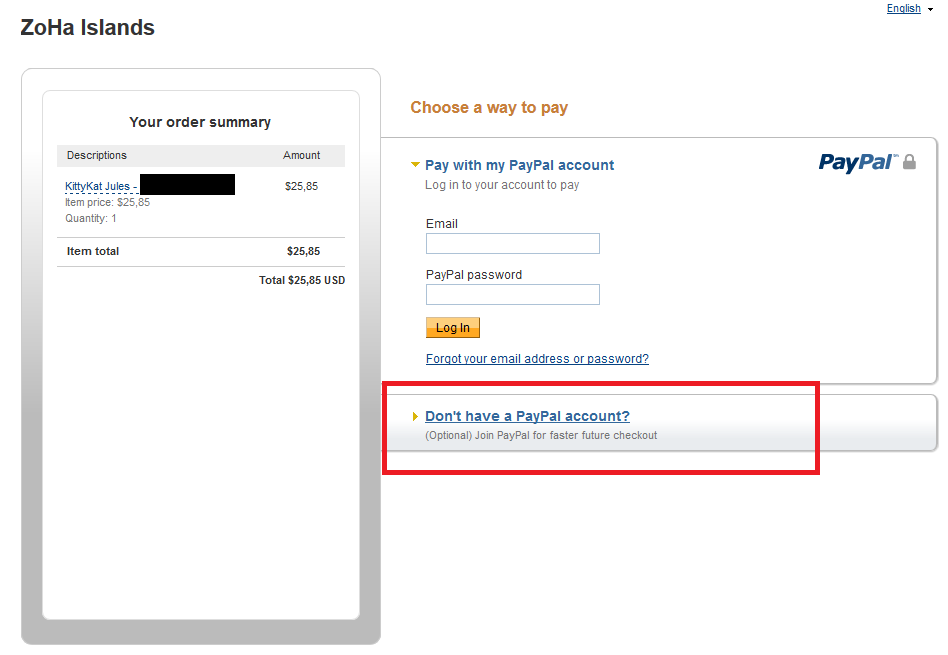
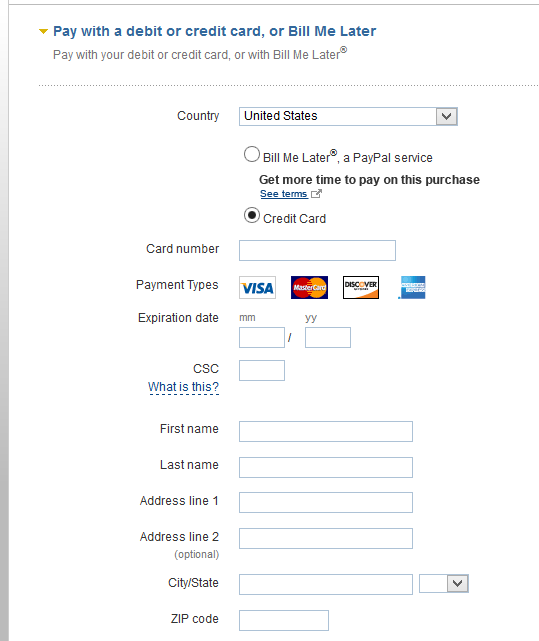
  • 7. On the PayPal screen you can choose “I don’t have a PayPal account” and manually enter your credit card info as you can see in the screens below.
    (Click on them to zoom)

PayPal-01

PayPal-02

PS:
PayPal / Credit Card payments need to be booked manually. So it might take a few hours before we have booked your payment.

Repost from the Official Linden Lab Blog:

Updated Second Life Terms of Service

by Community ManagerLinden Lab ‎05-07-2013 10:41 AM – edited ‎05-07-2013 11:55 AM


When you log in to the Second Life Viewer today, you’ll be asked to accept an updated Terms of Service. As with any legal document, it’s important to read in its entirety before accepting, but we wanted to highlight one of the changes we’ve made in this update: to better protect Second Life users against fraud, the updated Terms of Service make it clear that trading of Linden dollars (L$) on exchanges other than the LindeX, Second Life’s official L$ exchange, is not authorized or allowed.

 As the official exchange owned and operated by Linden Lab, the LindeX is the best place to buy and sell L$ for use in Second Life. It consistently offers the best rates for both buyers and sellers, and by limiting L$ trading to the exchange we operate, we are better able to protect users against fraudulent activity.

 The majority of Second Life users who purchase L$ do so through the Second Life Viewer by clicking on the “Buy L$” button. There will be no change to that function, as these orders are placed directly through the LindeX. Similarly, shopping on Marketplace will not be impacted.

 If you haven’t used the LindeX before, check out this Knowledge Base article and the video below for more information:

Server Side Baking Update & Supported Viewers

Hello ZoHa Islands –

Server Side Baking or SSB as commonly referred to –  renders clothing layers, avatar’s skin, tattoos, alpha from the client side to the server much faster.

The major benefit to SSB is no more cloud avatars. This is because the baking [rendering] of your avatar is moving to the Region Server  your Avatar is standing in. This new method of baking eliminates delays in passing rendered information to all viewing your avatar.

Currently your avatar is rendered on your PC with information then transmitted to the server to distributed to others viewing you. Avatar rendering performance in the past was tied to the quality of the Internet Connection to and the speed of the the Client PC.

Those who delay upgrading to a modern viewer will still see avatars as before with the exception that the textures rendered by the SSB code may be missing from them leaving a white mask on the prim/layer shape. In addition to the SSB code upgrades, several other updates will also be rolled out at this same time.

The good folks at Linden Lab are testing server side baking for official Second Life Viewers which is projected for release within the next 2-4 weeks.

Supported Viewers as of April 25th – 2013

You can read more about SSB here or on our blog or on Firestorm’s Blog

Please check back for updates!