Casting Call: Apply to Star in a Second Life Ad Campaign!

Hello ZoHa Islands –

Want to be featured in a new Second Life Ad Campaign?  Well here’s how…!!

Casting Call: Apply to Star in a Second Life Ad Campaign!

by Community Manager Linden Lab on ‎04-17-2013 10:40 AM


face2face.jpg

Pictured: Lorna H. and her Second Life avatar counterpart  Lollie Bigwig.

Banker by day, but intergalactic space cowboy in Second Life? We may be looking for you!

We are now casting both humans and their avatars for a new promotional campaign that will be featured on SecondLife.com and across the web.

For this campaign, we’re looking for people who are comfortable revealing their “human side” alongside their avatars in Second Life, like in the image above. Specifically, we are looking for those whose avatars do not physically resemble their owners.

This promotion aims to spotlight the diverse and creative communities in Second Life, so please apply if you’d like to share your passion for Second Life with the world!

To be considered, please fill out this application form by 11:59 PM Pacific on Wednesday, May 1, 2013. All submissions will be reviewed by the creative production team for the campaign, but no personal information provided will be disclosed publicly unless you are selected and specifically consent to participate.

We look forward to hearing from you!

ZoHa Islands Spring into Spring Hunt Event Prizes – Round 2!! (Starts April 1st!)

ZoHa Islands is proud to announce the arrival of its first Spring into Spring Hunt Event.

Over the next couple of days I will display some of the awesome finds from our vendors on this Hunt! We’ve got some great giveaways from some great merchants 🙂

All Items are 100% FREE to you!

Hunt Locations and Hints can be found here!!

{Sickly SWEET} Spring Flower Bag 1

Pictured Above ^^^
{Sickly SWEET} Spring Flower Bag

._S.M_. Spring - Picnic Rug 1

Pictured Above ^^^
.:Stone Misery:. Spring – Picnic Rug

Sky - Glam Dreams - Fashion Fears

Pictured Above ^^^
Far Left > [Fashion Fears] MESH – Maya Dress
Center > Sky~ Crape Top & Sky~ Patchwork Tweed HW Skirt from Sky Mainstore
Far Right > Glam Dreams Sexy Spring with Flowers

Two Moon Gardens Moments

Pictured Above ^^^
Two Moon Gardens – “Moments” – Includes Trees and Foilage/Flowers and a Blanket with a Interactive Menu for Lovers, Singles & Friends – all packed in a nice rez box for easy set up.

ZoHa Islands – Spring into Spring Hunt Event – Starts April 1st!!

ZoHa Islands is proud to announce the arrival of its first Spring into Spring Hunt Event.

Over the next couple of days I will display some of the awesome finds from our vendors on this Hunt! We’ve got some great giveaways from some great merchants 🙂

Hunt Locations and Hints can be found here!!

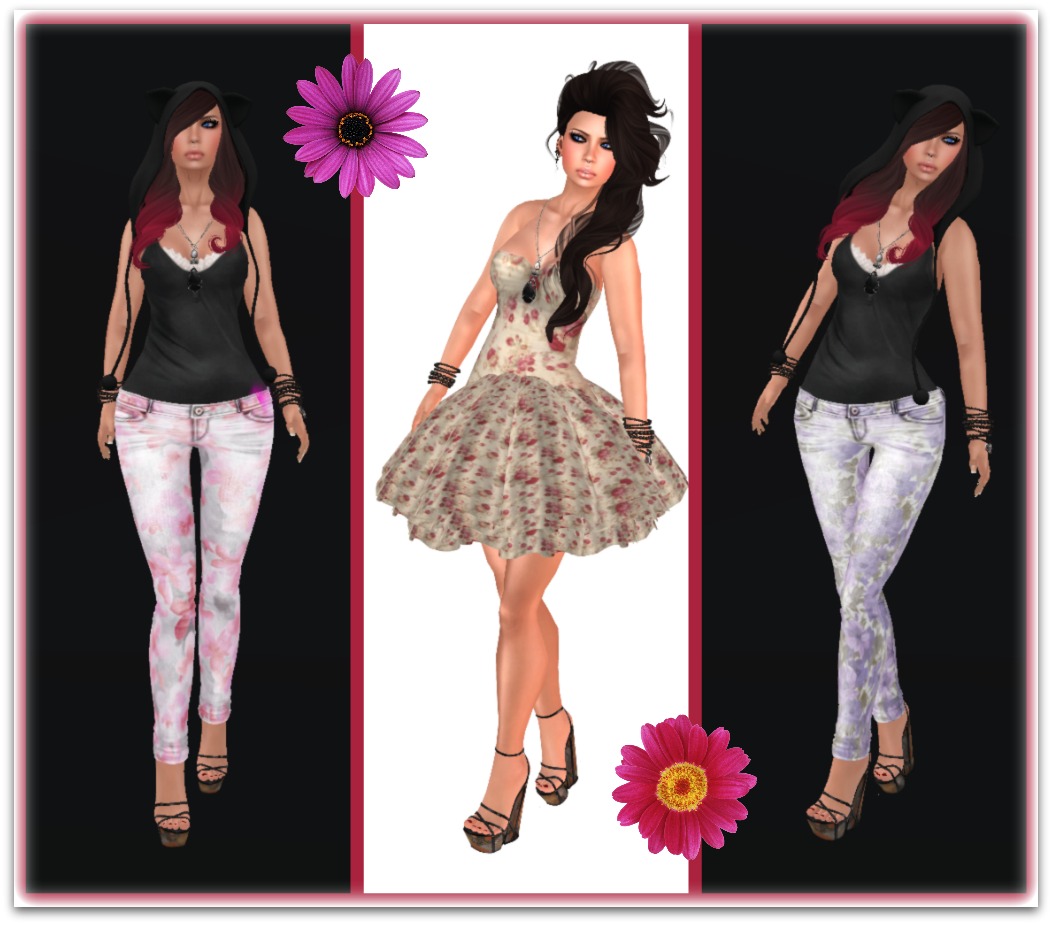
Defunkt & Get Frocked ZISIS

Pictured Above ^^^
Far Left > .defunkt. [Skinny Mesh Jeans] ZISIS – Spring Pink
Center > GET FROCKED! Spring Had Sprung Dress
Far Right > .defunkt. [Skinny Mesh Jeans] ZISIS – Spring Blue

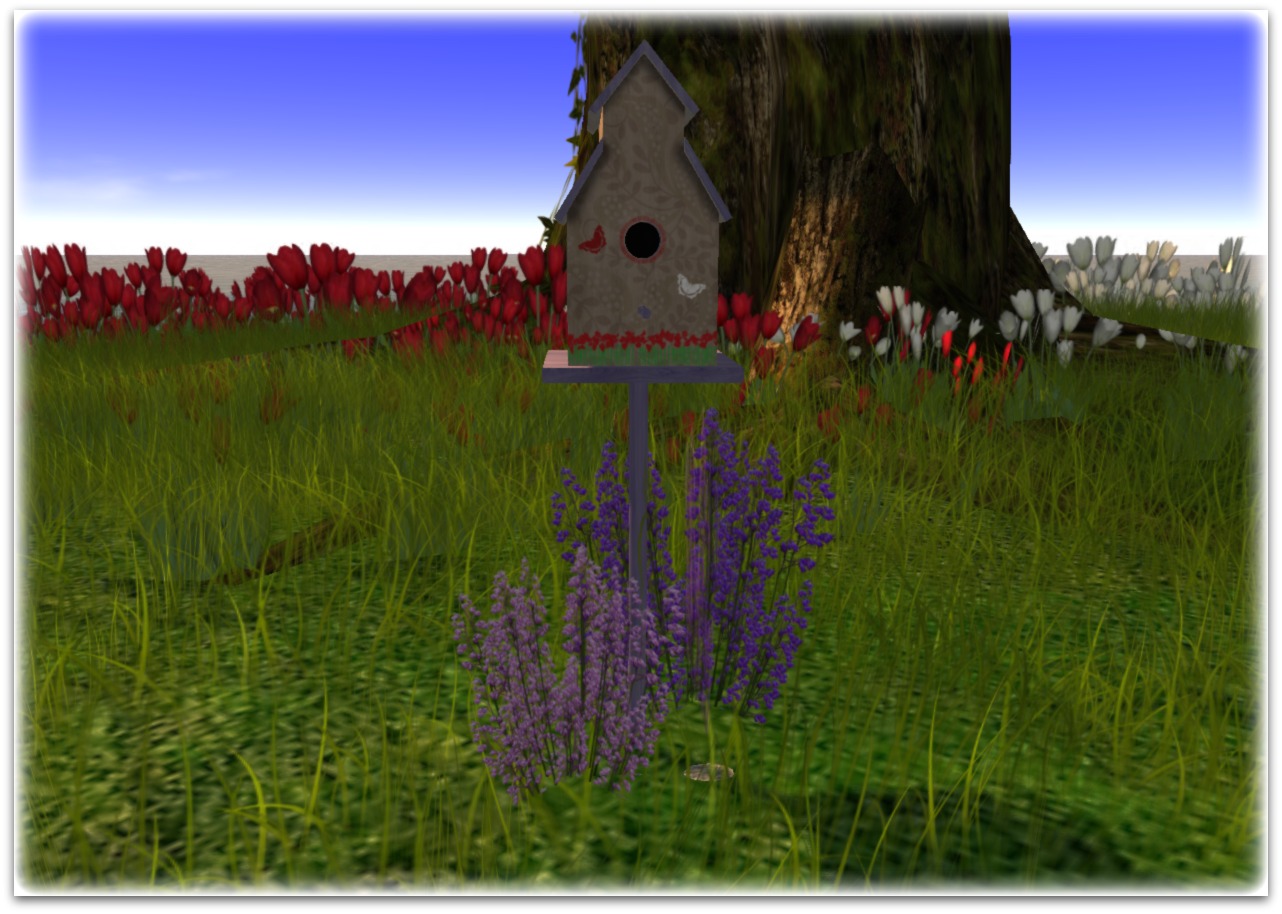
Happy Homes Bird House

Pictured Above ^^^ Home Decor! from Happy Homes!
H.Homes ~ Birdhouse ~ Part Mesh ~ ZISIS Hunt Prize

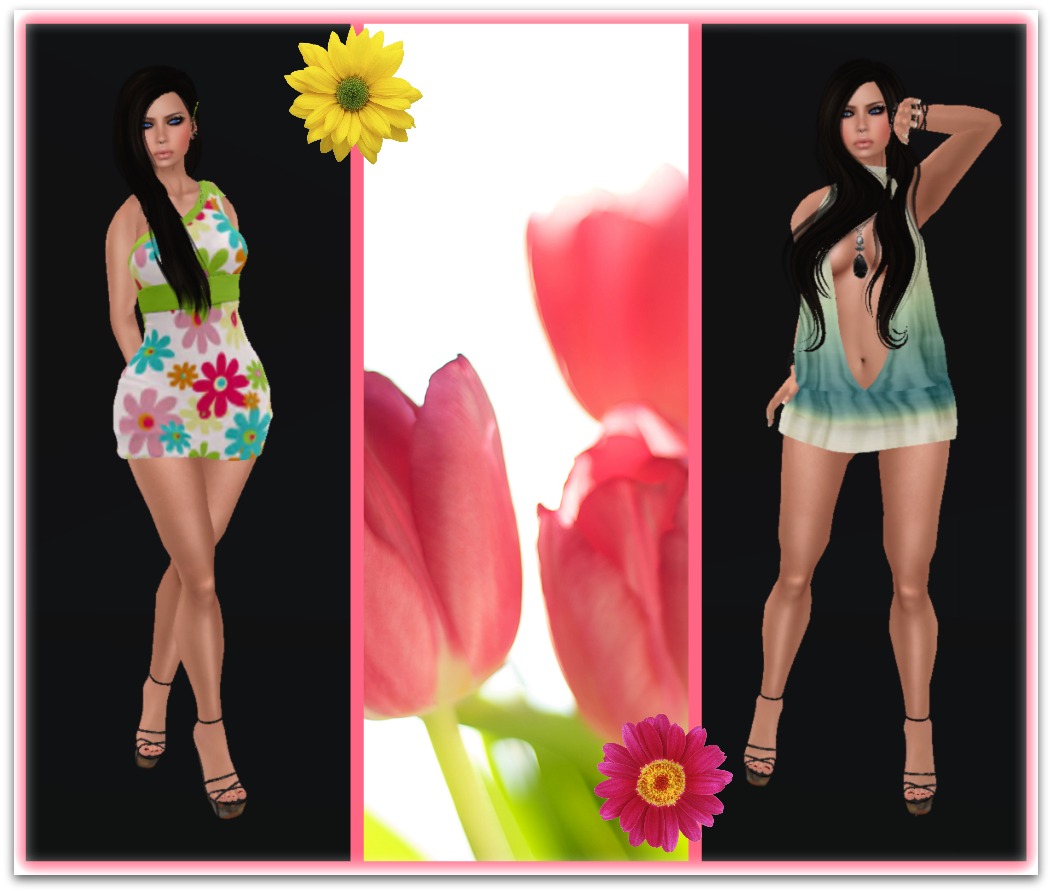
Intrigue & Blah Blah Blah

Pictured Above ^^^
Far Left > Intrigue – Spring Into Spring Dress
Far Right > blah.BLAH.blah*MESH* Spring Halter Dress

10 Tips to stay secure in Second Life!

Hello to all at ZoHa Islands – lets talk about paranoid! Here are 10 tips to stay secure in Second life and all around in general on the Internet.

They’re watching you. Literally. In a recent article posted at Ars Technia, it was reported that hackers have the ability to remotely take over your computer and install software on your computer that allows them to turn on your webcam. What? They do this using a RAT pack (Remote Administration Tool). In addition to that, we are hearing of new router exploits that give a hacker the ability to remotely access your router and gain access to your Local Area Network. If you think you’re overly paranoid about your computing you should be. This stuff is scary.

So now that you know that the whole world is out to get you, what can you do about it? These steps will help close some of the holes used to exploit computers.

Turn off Remote Administration – Remote administration in routers give users outside of your network the ability to access and control your router. In many cases, this is turned on by default. What? Of course the intention of this option is benign, but it can be used by a hacker to get into your LAN and see all of your internal computers, manipulate your firewall and do basically anything they want with your traffic.

To do this, you can navigate to your router’s admin page using your web browser. Normally, this can be done by typing http://192.168.1.1 or http://192.168.0.1 into your browser’s address bar (not the search bar). Your router location may vary. You will also need to know the username and password of your router. If you do not know it, and the router was supplied by your ISP, you can check the physical device to see if the information is printed there or call your ISP for log in details.

Look for an “Advanced” or “Administrator” tab and make sure remote administration is disabled.

Turn Off Wake On LAN – While not necessarily an exploit, WoL allows your computer to be turned on when powered off from an outside source. Imagine this, ole paranoid one, if a hacker had access to your internal LAN and had the ability to turn on your PC whenever he or she wanted to perform whatever nefarious acts he or she wanted. Unless you have a specific need to have it on, go into your computer BIOS when booting and disable that wicked feature. Depending on your BIOS, it may not even be an option.

Turn Off Allow Network Traffic To Wake Computer – Similar to WoL, your network adapter has the ability to listen to network traffic and can allow your computer to be woken up while asleep.

To shut this down, go into the Control Panel, look for your network adapter, right-click it and select Properties. Under the Power Management tab, uncheck that option if it is checked.

Pic1

Turn Off UPnP – Turn off Universal Plug and Play in your router. Universal Plug and Play allows programs within your network to automatically punch holes in your router. What? Us paranoids can’t allow this to happen! Imagine a virus on your network having free reign to open ports on your router to allow even more bad guys in. For most of us, having this feature off will not affect anything we do from day to day. For others, you may need to occasionally go into your router and manually open ports for programs or system that require them to be open–like game consoles, for instance. You can turn off UPnP in your router.

Uninstall Java and Adobe Reader – With Windows doing a better job securing the OS, hackers are seeking softer targets like Java and Adobe Reader, both of which seem to have some type of zero-day exploit a couple times a year. Most of us have these programs just sitting on our system, never being used and never being updated to the latest versions. If you simply must have them, be sure to update them frequently.

Scan Your Ports – The Gibson Research Corporation (GRC) has been providing a free online tool to scan your router for open ports for over ten years. This tool is called Shields Up and you can find it here. The UPnP Exposure test will check to see if your router is open to a new router exploit that gives hackers the ability to access and control your router.

Pic 2

If all is well with the GRC test, you will see the above image.

Run Your Browser In Privacy Mode – Private Browsing (which may be called something else depending on which browser you’re running) allows you to surf without the fear of a history being saved, and temp images, videos, files and cookies being stored on your computer.

In Firefox and IE, this is enabled by hitting CTRL+Shift+P.

In Google Chrome hit CTRL+Shift+N for Incognito mode.

Do The Basic Computer Security Measures – Of course, you should also make sure you are running a current antivirus–if your free antivirus from Symantec or Mcafee has expired, uninstall it and get another. If you do not have one, Microsoft Security Essentials is free. In addition, make sure your WiFi is encrypted in your router settings using WPA-2 so the whole neighborhood isn’t using your bandwidth. Make sure you have Windows automatic updates turned on. Make sure your Windows firewall is also enabled. Modern Windows Operating System will have these on by default, and if you’re running Windows 8 you also already have an antivirus called Windows Defender–built in.
Using general account: you should always run as a standard user. The theory is, if you happen to get malware on your system, the malware will not have the elevated rights of an admin because it is running under an account that only has standard rights. While this won’t necessarily protect you completely, it is one more thing you can do to slow down the bad guys. Keep your admin account, of course, because you will occasionally need it to install software, etc.

Use WAP-PSK encryption instead of WEP
WEP is like locking your house with a screen door.
Thanks for reading have a great week…

Deuce Marjeta
Operations Manager

Paying Tier at ZoHa Islands – Terminal/Tier Meter Functions

Hello ZoHa Islands –

While some of you are quite familiar with our tier terminals and system, we still do get questions on how it operates and the functions it provides. So here is a detailed manual on the many functions and operating the terminals to make the most out of the tools we at ZoHa Islands provide our residents. Help us help you!

Upon purchase of any of our land you are given a Welcome Package with a ZoHa Islands Tier Meter inside the folder along with some other useful information, Notecards and Landmarks.

Below is a picture of exactly how these tier meters work – they can help you plan when your tiers need to be paid, and in turn help with the workload of sending overdue notices from our staff.  If there is an instance where you are going to be late – please contact us via support ticket so we can note your account (Please note approvals on late payments are done on a case by case basis and depend on your payment history with ZI).  We also offer a daily pay option for those times when L’s may be a bit tight or you are going away a few days RL.

If by chance you need a new one – they can be picked up next to the tier terminals located in our sales office.  The boards are 1 prim so can easily be rezzed and hidden in an discrete place on your land.

ZI Tier Blog Pic 8

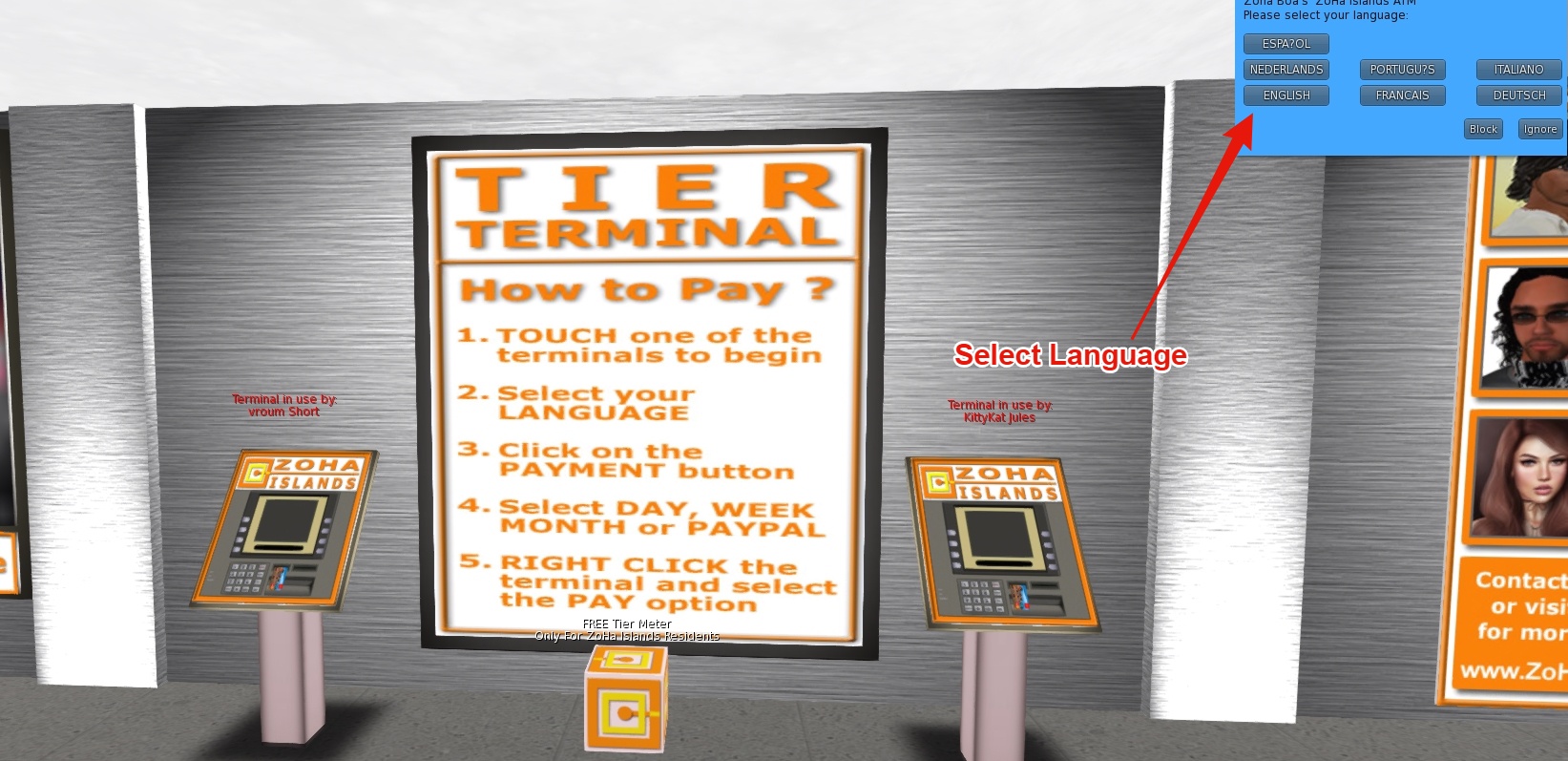
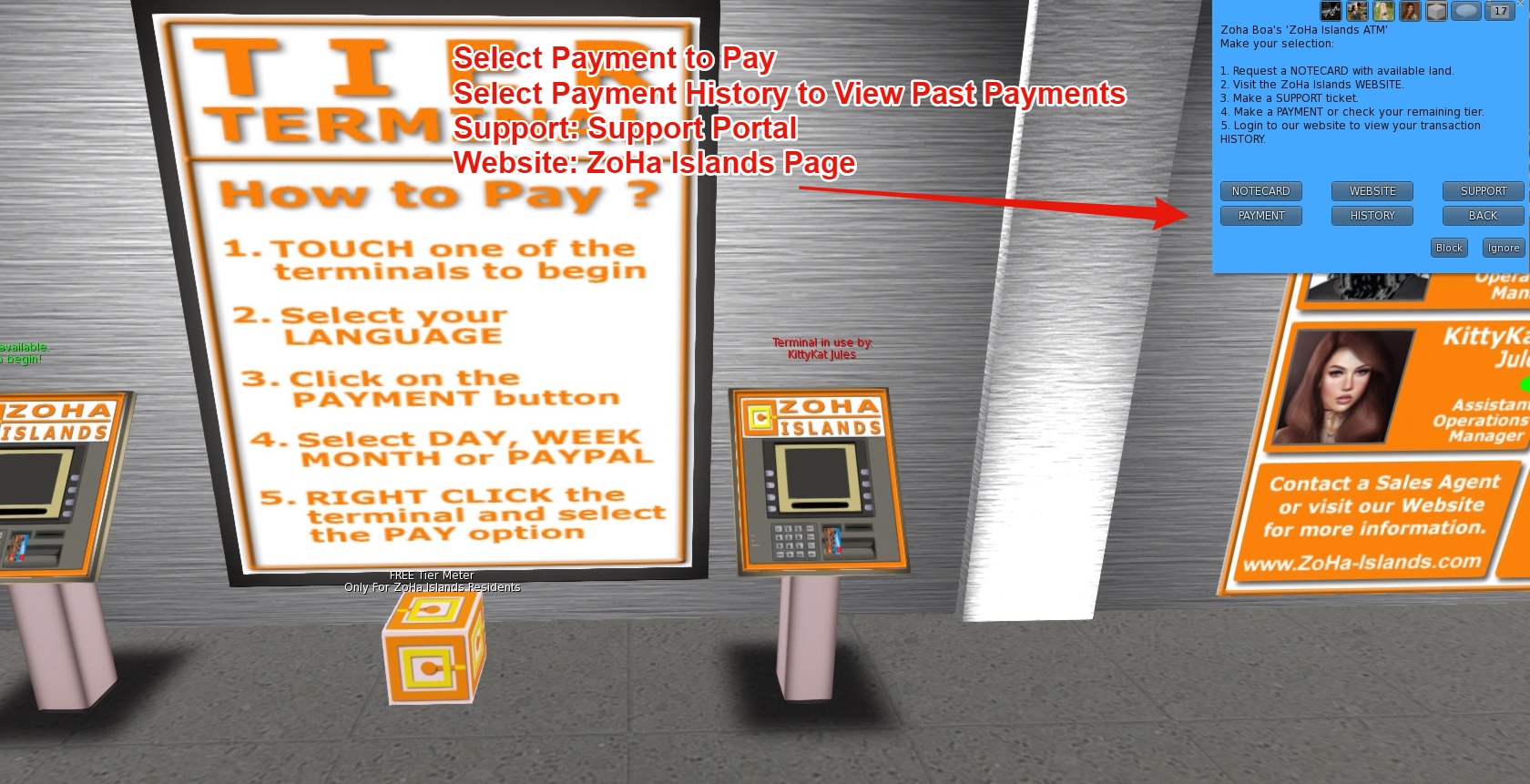
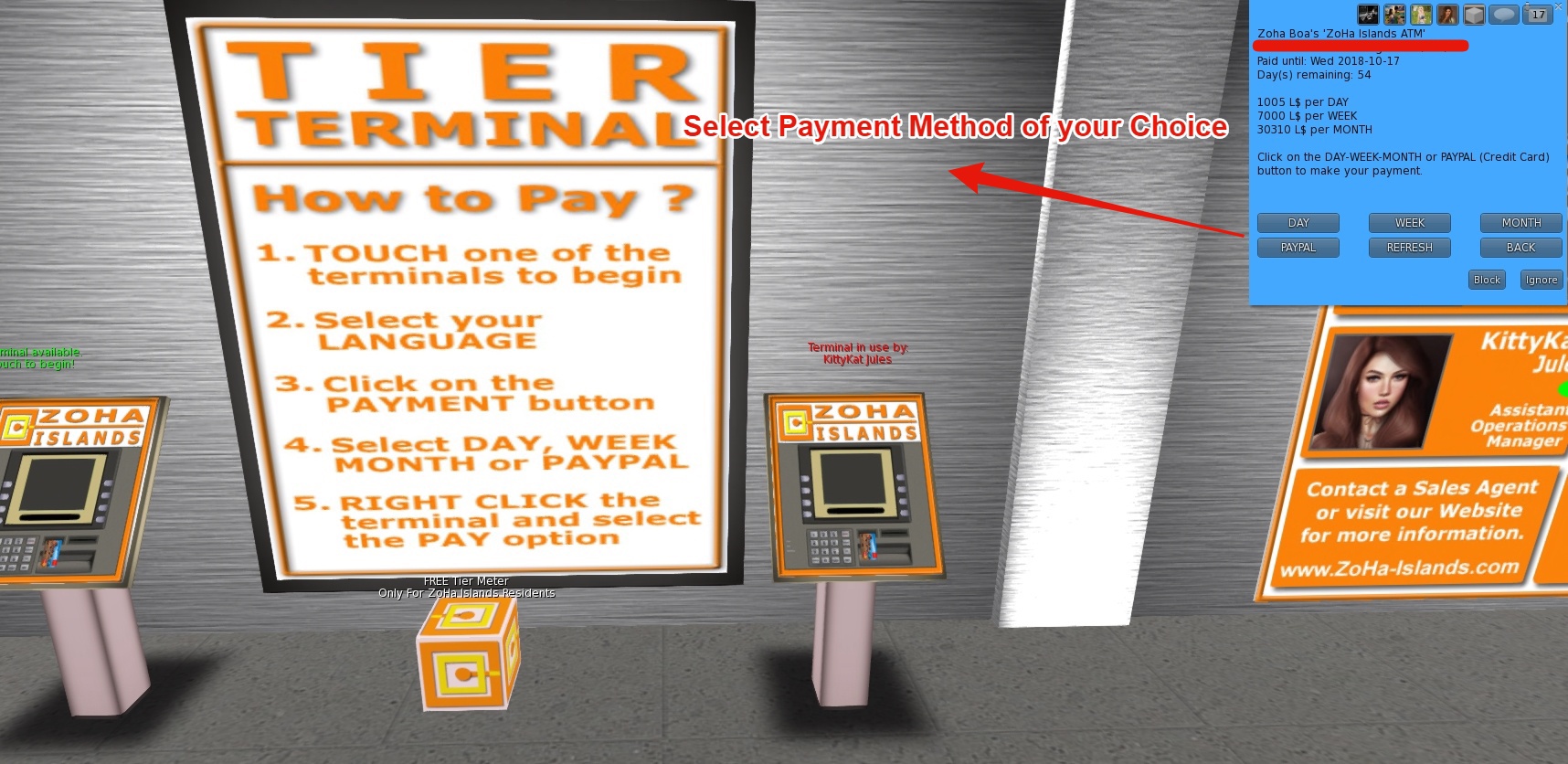
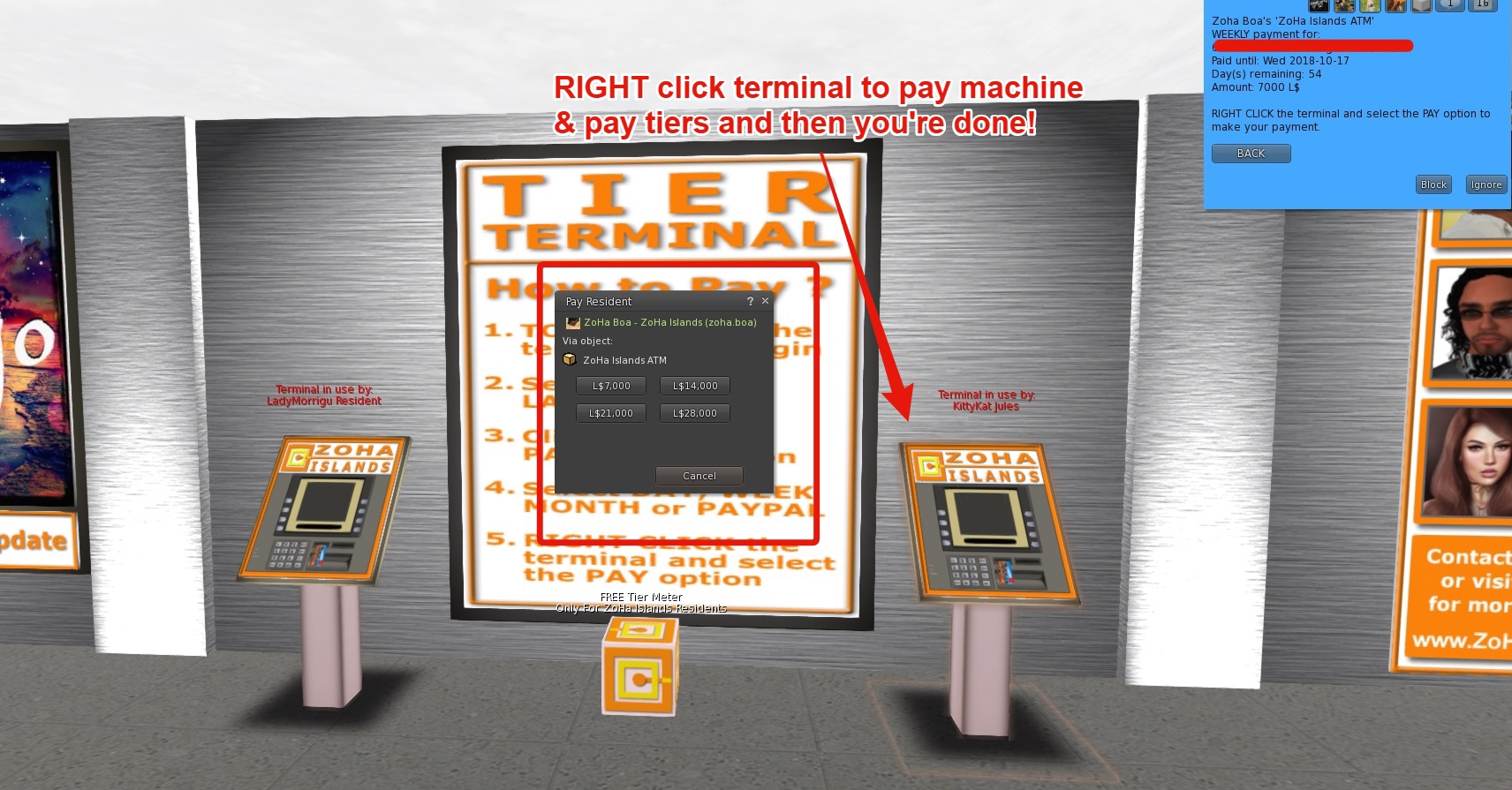
Here is a step by step instruction on how the tier terminals function and the wide array of options they do provide. They can be found in our sales office.

Select Your Language from the first menu:

In the Next Menu you can Select to receive a Notecard with a Link to Available Parcels, Visit our Website, See your Payment History or Make a Tier Payment – Please select the option that best suits your needs.

In the Third menu -you can select the payment amount of your choice – Daily – Weekly Monthly and/or PayPal – Even set up recurring payments – so you don’t ever have to visit the terminal again 🙂 Tiers can be paid via Paypal even if you don’t have an account using your debit/credit card.

To complete the transaction using Lindens – Right click the terminal at this point and pay the appropriate amount – your account will be automatically credited.

If you choose to pay with PayPal – you will be directed to click on a Link to take you to the PayPal Payments page -(picture below)

You can pay with a one time payment via PayPal or a Automated Subscription.

PayPal payments are manually processed once/twice per day by ZoHa Islands Owner.
Because of that it is possible that the tier terminal is not up to date when you check your remaining tier.

How to cancel your PayPal subscription when needed?
1. Log into your PayPal account on http://www.paypal.com.
2. Click on the settings gear (upper right corner)
3. Click on the Payments Tab
4. Look for your Preapproved Payments – Find the ZoHa Islands Payment Agreement
5. Click the CANCEL button.

ZI Tier Blog Pic 7

ZoHa Islands – Spring into Spring Hunt Event!!

ZoHa Islands presents the Spring into Spring Hunt Event.

List of Hunt Landmarks

#01 – Intrigue
Hint: It maybe Lust

#02 – blah.BLAH.blah
Hint: Boredom is never a issue in spring…

#03 – [[[[[NOISE]]]]
Hint: Time flies but spring is here!

#04 – Two Moon Gardens
Hint: Can be found where the elegant water falls

#05 – defunkt
Hint: Starlight, starbright. Kinda.

#06 – Sky Mainstore
Hint – Bluebirds may be flying

#07 – Fashion Fears
Hint: I love Maya

#08 – [Tia]
Hint: The sun is on fire, In the sky, And in its warmth Flowers open, In the garden, And the butterfly, Flutters by.

#09 – .:Stone Misery:. Prefabs & Furniture
Hint – We go down the rabbit hole!

#10 – {Sickly SWEET}
Hint – Mmmm, the smell of waffles

#11 – **Sjaja**

#12 – Get Frocked
Hint: All Bagged up and Ready to Go

#13 – Happy Homes
Hint: Lots of flowers start to grow in the spring, most start their lives in a greenhouse.

#14 – Withdrawn – please skip

#15 – Pure Gestures

#16 –  Redrose Jewelry
Hint – Catching the sun.

#17 – Mitch’s Novelty Shop
Hint: They are found in a cluster, sometimes in a circle. This is where the fairies like to dance and play

#18 – Kalylia Kreations
Hint: Spring is here, The sky is blue, Birds all sing as if they knew, Tis the season folks say “I do”, Now the search is up to you.

#19 – Glam Dreams Main Store
Hint: “In Spring, violets bloom and fill the air with their aroma. Ladies love to dance with sweet melodies in sexy elegant gowns”

#20 – 69 Park Ave Main Store
Hint: Prestigious Formal wear can be found at 69 Park Ave.

#21 – Khargo
On Screen

#22 – RoNa Enterprises
Hint: Pick me Up from the dark

ADULT STORES
#23 – It Figures
Hint – Dresses here fit A, B, C, D cup. While in there try looking up.

#24 – Bebe Boutique
Hint: British Headbanger

#25 – Arrongard Couture
Hint: I fly with the hearts

#26 – Forbidden Butterfly
Hint:2nd floor all dark leather in the dark night you’ll find a flower just as sweet as the lady who wears it.

#27 – PRISM
Hint:Kitty Kitty Kitty…where are you Miss Tabby

#28 – Stitches Creations

—————————————————————————————————-

When: April 1st – 30th

Theme: All things Spring!

Type: This hunt is an Estate wide hunt which includes participating businesses from around Zoha Islands Estates.

Application Deadline: March 20th – Can be picked up in the Main Tier Office or Business District Tier Office via the clickable application boards.

Sim Ratings Allowed: PG, Mature and Adult – Sim rating must be specified in Application Notecard for website link list purposes.

Hunt Cost: 0L

Requirements: Your business must be within ZoHa Islands Estates to be a vendor in this hunt.
**Original creations only please. No resale shops**

Want in??? – then read on!

ZoHa Islands - Spring Into Spring Hunt Poster vendor pic

—————————————————————————————————–

~RULES~

Please read the following rules carefully before apply to the ZI Spring Into Spring Hunt.
—————————————————————————————-
Hunter Rules:

1. Absolutely no using group chat to give out item position.  This is suppose to be a hunt event not a “Let me show you where it is” event

2. Do not tell others in local where the hunt item is.  This ruins it for other customers that are there to enjoy finding the item.  Believe it or not but some people do the hunts for the joy of finding something… not just for the free goodies.

3. Have fun!!

Vendor Rules:

– ABSOLUTELY NO CLUBS OR RESALE SHOPS –

1. YOU MUST HAVE your business within ZoHa Islands Estates in order to be a vendor in this Hunt.

2. Whether having read these rules or not by submitting your application you are agreeing to them.

3. PLEASE place your hunt poster in a visible area close to your landing point as soon as you are accepted.

4. You will be required to be in the ZoHa Islands Hunt Group for the duration of the event.  This group is separate from the ZoHa Islands resident support group.  You need to have yourself, another store owner, or an alt that is checked often in the group at all times or your store may be dropped from the hunt.

5. You must follow the timeline to the letter or risk being dropped from the hunt.  The hunt organizers will be working very hard to keep things running smoothly but to do so we need your help.

6. Please include ONLY your original creations specific to the hunt theme. Must not be an item you have in your store currently.  *Keep the item exclusive during the hunt. Do NOT sell the item in your shop while the hunt is going on. After the hunt, you may sell the item if you wish.

7. Please showcase some of your best work.  Remember this is your chance to shine.  People will be taking your gifts home and looking at them later.  You want them to see your gift and want to come back to your store to get more of your wonderful items.

8. “Adult sim” stores – This hunt is open to everyone. If you require age verification, payment info or SL age or only allow certain avatars into your sim then this hunt is not for you.  Adult stores that apply to the hunt will automatically be placed at the end of the hunt among all participating adult stores.

9. DO NOT modify Hunt Items (eg. be made too small, recoloured, renamed, or hidden inside objects).  They must remain set for sale for 0L.

10.  ALL hunt applications, hint cards, store changes cards or any messages to Echo SpiritWeaver need to be made into a notecard with the hunt name (initials) and your SL name (not display name). Appropriate notecards have been given to you in the vendor welcome pack..

11. If there is any change to your store slurl/hidden item/etc, fill out a NC and send it Echo SpiritWeaver

12. Please place the hunt item INSIDE your store, not outside/on top/etc.

13.  If you wish your item to be blogged about prior to the hunt you will need to send your hunt item into the group. (more info about that in your welcome packet)

Have fun with this hunt!!!!

** If you dont think you can follow these rules or the Timeline please DO NOT apply **


Hunt Timeline!!

March 20th – Application Deadline, all applications need to be filled out and returned

March 20th-22nd – Vendor Kits will be passed out to all vendors that are accepted into the hunt

March 20th-23rd – Posters need to be up in your store where it is visible to all customers.

March 20th-23rd – Poster checks will be done by hunt organizers to make sure you have them out

March 25th – Items need to be sent out for the bloggers so that your item can be advertised before hand.  This can be done via the Vendors/bloggers group.  We want to build some hype for this event.
HINTS need to be sent in.

March 24th – Empty hunt prim needs to be set out next to the poster so we can check to see it is set right with the correct LM to the next store.

March 26th-27th – Final walkthroughs will be done to make sure that your store is ready.  Naughty list will be made of any stores not set up for the hunt

March 29th-30th – Make up walkthrough will be done on only the stores on the Naughty list.  If those stores are not in compliance with the rules or are not ready for the hunt they will be dropped.

March 31st – Hide your hunt prim, put your gift in it, and set it for sale by the time the clock strikes midnight.

April 1st – 12am SL time the hunt officially starts

Official Hunt Blog

All links, hints, and stores will be listed here.

——————————————————————————

There will be an opportunity to become a “Feature” Business for this hunt.

First 6 applications received will be placed on the poster which will be promoted by ZoHa Islands

Please return the notecard and direct any questions to:
Echo SpiritWeaver
(Zoha Islands Commercial Manager)