
LL Mandatory Viewer Upgrades!


Hello ZoHa Islands –

Today we would like to give special attention to a recent post from Jessica Lyon and the entire Firestorm Team.  This has very important information regarding the new Server Side Appearance Coding and how it will affect your Second Life.

This means everyone will need to UPGRADE! 🙂

We all know change can be difficult and we want to see the transition as quick and easy as possible, therefor Firestorm also hosts some wonderful classes that can be found by joining the in world group, where you can learn to navigate your viewer menus, upload your AO into your viewer – this reducing the clutter on your screen and the scripts you wear.

“According to the latest statistics from LL there are still some 67,000+ users on Phoenix and 77,000+ on Firestorm versions that are NOT compatible with Server Side Appearance (for Firestorm, that means any version older than 4.4.0). That is nearly 150,000 users who will have to update in this two-week period. I suspect most will wait until the very last minute or will wait until it’s too late. This means our support team, being the only live, dedicated viewer support team in Second Life (to my knowledge) is going to be absolutely inundated. Because of this I’m going to ask you, our users, for a few favors. Before you run to our inworld support groups…” – Jessica Lyon


Firestorm 4.4.1.34164 Release

Everyone has to upgrade!

Linden Lab has stated they intend to begin rolling out Server Side Appearance (formerly known as Server Side Baking) on July 9th or shortly thereafter. It is of paramount importance to your user experience that ALL our users upgrade to this 4.4.1 version before the 9th of July. Even our 4.4.0 users should upgrade because 4.4.1 contains some additional SSA code from LL.

Clean install!

Support will kill me if I don’t mention this near the top… most of the issues that get reported to support immediately after an upgrade could have been prevented by performing a clean install, which includes manually clearing the settings files from your hard drive, along with uninstalling the application and manually wiping the cache. If you are on 4.4.0 you can create a settings backup prior to doing a clean so that you can restore your settings quickly and easily afterwards. Video tutorial on that here.

The fixes and new shiny

We are aware that there are a percentage of users who could not use 4.4.0 for one reason or another, and so it was very important that we do our best to fix those issues and get it out to you before Server Side Appearance rolls out. This update resolves all the issues we are capable of resolving in such a timeframe, and we hope it will improve performance and stability for everyone. It also comes with some great new features and options that we encourage you to check out and hope you enjoy.

A full change log can be found here http://wiki.phoenixviewer.com/firestorm_release_4.4.1.34164_change_log and downloads from our downloads page.

Phoenix users

The time is now folks! In less than two weeks’ time, avatars are going to begin looking horribly wrong to you and, likewise, you will look horribly wrong to everyone else on up-to-date viewers. We have gone to great lengths to offer you options, features, skins and customization in Firestorm to allow you the closest resemblance to Phoenix as is possible in a V3 code base. We have been doing this work since the beginning, and it even carries into this 4.4.1 with even more Phoe features such as an independent Radar floater, name auto complete, region script count notifications, ability to minimize floaters to bottom left instead of top left and more. We have gone to these efforts because we truly do care about your user experience and hope that you will stay with us as we continue development of Firestorm into the future.

However, if all these efforts are not good enough, please know that you also have other viewer alternatives you can choose, available from the LL Third Party Viewer Directory here. The bottom line, however, is that if you want to continue seeing other avatars and being seen normally, you will have to upgrade to something… now. We have video tutorials on our YouTube page here, including a video about migrating from Phoenix to Firestorm here. We will begin using all our resources to notify Phoenix users of the upcoming change and the need to upgrade. If you are a Phoenix user, you may find this to be annoying and nagging – sorry about that – but there are a great many users who do not pay attention to upcoming changes and have no idea their experience is about to become epic fail.

Our support nightmare…

According to the latest statistics from LL there are still some 67,000+ users on Phoenix and 77,000+ on Firestorm versions that are NOT compatible with Server Side Appearance (for Firestorm, that means any version older than 4.4.0). That is nearly 150,000 users who will have to update in this two-week period. I suspect most will wait until the very last minute or will wait until it’s too late. This means our support team, being the only live, dedicated viewer support team in Second Life (to my knowledge) is going to be absolutely inundated. Because of this I’m going to ask you, our users, for a few favors. Before you run to our inworld support groups

WIKI, WIKI, WIKI! – Please search for your problem on our wiki first. The best way to search the wiki is to start typing a keyword into the search box, but don’t hit Enter! Just wait for a second and a drop down list of possible matches will appear. This is more effective than typing your search and hitting enter. Try it! Our main troubleshooting index can point you to tips for fixing the most common issues, as well!

JIRA. – Yes! Please file a support ticket! This is much easier for support and our development team to collaborate with you and each other on your specific issue. File a support ticket. 

Help us help! – If you see folks asking questions in our support groups and support isn’t around or is busy, and you know the answer… please feel free to try to help these folks yourself! Your help is hugely appreciated, but please don’t take offense if you are wrong in some way and support corrects you. We do still appreciate your enthusiasm and willingness to help. This is, after all, what we look for in new support people. We recruit based on attitude, willingness to help, persistence and resilience to negativity.

Patience grasshopper! – Please be patient with our support team, because…

  • They are 100% volunteers helping out because they want to help out.
  • There will be times when no one will be available. This is because we encourage support to take breaks rather than burning out.
  • They are human and make mistakes too.
  • Sometimes they don’t have all the answers and may not be able to help you with your problem.
  • They will be inundated with the 150,000 users who chose to wait until the last minute and then scream for support when they have problems that NEED to be fixed NOW… because they waited until the last minute.
  • Chat lag in the support group happens!

We truly hope 4.4.1 will be awesome for everyone! Also, you can expect a 4.4.2 in a few weeks which will contain “Polishing up code” from LL for Server Side Appearance.


Sincerely,

Jessica Lyon and the entire Firestorm Team

LL Repost – SLB10 FINAL Week!

SL10B Celebrations – The Final Week

by Community Manager Linden Lab ‎06-24-2013 04:49 PM – edited ‎06-24-2013 04:49 PM


We’ve hit the final stretch of this year’s Second Life Birthday celebrations! It has been a great month full of amazing events, plenty of swag, and good times, and there is still lots of fun to be had in honor of SL10B. Thank you to everyone who has participated in celebrating a decade of Second Life – we hope you’re having a great time!

 Don’t forget to share some of your SL10B snapshots for a chance to win a prize in the SL10B Snapshot Contest. Snapshot contest ends June 30th – so get your entry in before the 11:59pm PT deadline!

Premium members – you still have time to complete the exclusive grid hunt!

There is still some time to collect your limited edition inworld-exclusive items to commemorate the occasion. Visit the SL10B Community Celebration regions and look for the vending machines to collect your bears, jackets, furnished homes, and more. Regions will close to the public on June 29th.

Remember to grab your special edition items on the Marketplace before they are gone. Already more than 12,000 SL10B Bear Avatars, 5,000-plus SL10B Mesh T-shirts, nearly 3,000 SL10B Fireworks, 2,800 SL10B Old Style T-Shirts, and thousands of SL10B Resizable Baseball Caps and SL10B Party Packs have been claimed!

Our co-promotion with Alienware is still ongoing, and you have until July 17th to enter for a chance to win a new Alienware 14 laptop! See contest details for eligibility, rules, and legal information.

As the month comes to a close, there’s still a lot of SL10B fun to enjoy inworld, including more than 80 listings in the SL10B Destination Guide Category. Here are just a few of the entries to check out this week:


The Tightrope of Our Affection

Welcome to Blue Tsuki’s SLB10 art installation: The Tightrope of our Affection. This installation is an elegant immersive visual experience culminating in a self-referential meditation. Come see this celebration of virtual world installation art.

Visit in Second Life

Your Second Life Evolution

Over 50 avatars share their evolution from the beginning of their second lives to today. Enjoy Your Second Life Evolution, built by Harper Beresford of A Passion for Virtual Fashion at http://slfashionpassion.wordpress.com.

Visit in Second Life

Burn2-Conception

Burn2 celebrates 10 years of Second Life be looking at the unique role Burning Man had during its conception. See artist renderings of Burning Man’s 10 principles, live music and lots of fireside chats. The principles were crafted not to dictate of how people should be and act, but as a reflection of the community’s ethos and culture as its organically developed from inception.

Visit in Second Life

ZI Wants YOU! – Seeking Qualified Estate Managers!

Hello Zoha Islands.

Do you have what it takes to become a member of the ZoHa Islands Team?

We are currently seeking potential employees with previous estate manager experience.

Please NOTE:
Do not apply if you do not voice! (We do require a voice verified interview.)

Must also have a good working & RELIABLE computer/internet connection.

If you :

  • are available and online and able to do shift work
  • are minimum 6 months in SL
  • have the ability to speak multiple languages (it`s desired but not required)
  • have public relations & customer service skills
  • are pleasant and comfortable with potential clients
  • want to work in a dynamic team to sell the perfect land parcel to potential residents and provide the best customer service SL has to offer
  • have the ability to troubleshoot basic land issues and read sim stats – or the ability to learn and catch on quickly!
  • know how to navigate to different locations in SL, easy and fast
  • know how to promote our available lands & units for sale or rent

then maybe you want to give it a try and join our team.

Send your resume to Deuce Marjeta AND KittyKat Jules in a notecard with the following information (Please be as informative and thorough as possible):

  • Some info about yourself (Rez date, what you do at the moment, did in the past, …)
  • Where are you from in RL and What is your RL age?
  • Times you are usually in Second Life?
  • Languages you speak? (Please note you MUST be able to write/speak in English)
  • Past SL Estate Experience (List with length of employment, company names/owners)
  • A SL picture of yourself (please drag and drop this into the notecard)
  • Why do you want to work for ZoHa Islands?

LL Repost – Get the New Materials Viewer Today!

Hello ZoHa Islands – Linden Lab has released some exciting news today 🙂

This is especially wonderful news to the builds of Second Life!

Get the New Materials Viewer Today!

by Community ManagerLinden Lab ‎06-19-2013 10:12 AM – edited ‎06-19-2013 11:02 AM

Linden Lab is excited to announce the release of the Materials Viewer! This Viewer will allow content creators to build objects using normal and specular maps and will allow users to view the effects of this new feature set. The end result is photorealistic textured objects inworld, such as the SL10B Bear Avatar, which will look even better with this Viewer.

We’ve prepared a video to demonstrate the effect of Materials inworld and show builders how to add normal and specular maps to their creations.

In order to view Materials, you will need to have a Viewer that supports this feature and have Advanced Lighting Model checked under your graphics options. Not all systems will support this option; please see the Materials FAQ for more information on whether or not it is supported on your system. Additional documentation, including case studies, can be found on the Good Building Practices wiki and the Content Creators Guide.

original.png

We’d like to extend our thanks to developers from Exodus, Firestorm, and Catznip for their contributions to this feature. We are very excited about the result!

5 Essential Steps to Keep Your Computer Safe

Computers house so much of our personal data that it’s essential to set up protective measures in case of cyber attack or mechanical failure. These five must-do steps dramatically increase the odds your computer (and your privacy) will remain safe from the latest online criminal activity and let you salvage your most important files if your computer becomes irretrievably infected.

1. Updates are not optional

Updating the software on your system, including the operating system, is an absolute necessity. If you don’t download new versions of programs like Adobe Flash, your computer is more susceptible to malware. Updates to your Windows or Mac operating system help address new threats.

To keep your Windows system up to date, you can use Windows Update to make sure you’re getting the necessary adjustments. This is usually set to update automatically, but here’s how can check to make sure.

In Windows 7, click the Start button, type “windows update” into the search box. Click on Windows Update in the results (it will be under the Program section of the results.) Click on “Change Settings” in the Windows Update window that pops up and then check to see that the Install Updates Automatically option has been selected under Important Updates section. Then choose OK to save your changes.

In Windows 8,open the Search charm, enter “turn automatic updating on or off” and then click Settings. Microsoft issues new updates every second Tuesday of the month.

Mac OS X checks automatically for updates weekly if it has an internet connection. If it finds updates, will it use a pop up window listing the changes and asking you if you are ready to install them (which often requires a computer restart).

2. Uninstall Java

Java is a program that websites used to incorporate into their systems, but is rarely used now. Continuous security holes allowing malware to infect computers through Java makes it no longer safe to leave it on your system unless you absolutely need it. Even the Department of Homeland Security has recommended removing Java from your computer or, at least, disabling it in your browser.

We recently posted a step-by-step guide to identifying if your system has Java installed and what you need to do to remove or disable it. We cannot stress enough the importance of uninstalling Java for the health and security of your computer.

How to disable or uninstall Java?

The easiest and most certain way to protect yourself is simply to uninstall Java, as you would any other other program. If you don’t need Java, and most people do not, this is the safest course. If you encounter a program in the future that requires Java to run, you will be prompted to reinstall it, and you can decide whether or not to do so.

UPDATE 1/14/13:Uninstalling Java may not remove the plug-in from your browser. After the uninstall, we recommend you check your individual browser settings as outlined below, as well.

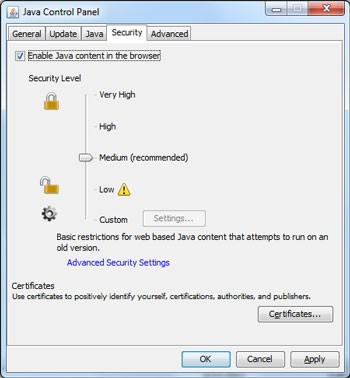
For Windows users, the latest version of Java, Version 7 Update 10, also allows you to disable Java in all of your browsers through the Java Control Panel. Find the Java icon from within the Windows Control Panel, go to the Security Tab and uncheck “Enable Java content in the browser”

Mac users and Windows users with earlier versions of Java who wish to disable Java should follow the instructions below for individual browsers.

Internet Explorer:

Click on the Tools dropdown menu, then Manage Add-ons.

Find the Java Plug-in under Toolbars and Extensions (it’s listed under Oracle America), highlight it and click Disable.

Chrome:

Click on the Chrome menu, and then select Settings

At the bottom of Settings window, click Show advanced settings

Scroll down to the Privacy section and click on Content Settings

In the Content Settings panel, scroll to the Plug-ins section and click Disable individual plug- ins.

Find the Java plugin and click Disable

Firefox:

Click on the Firefox tab and then select Add-ons

Select Plugins, find “Java (TM) Platform plugin” and click Disable (a of 1/11/13, Firefox has automatically disabled the Java plugin, but you should check to verify this has been done for your browser).

Safari:

Choose Safari Preferences

Choose the Security option and uncheck Enable Java

What if I need to use Java?

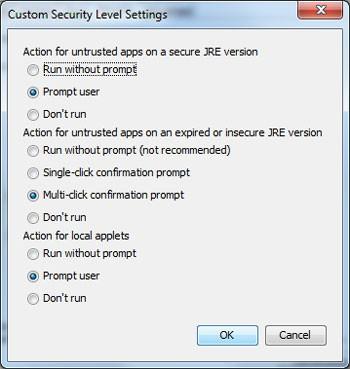
Use of Java on websites is becoming more rare and most users will never need to use it. However, there are certain applications that do require Java (such as the online trading app some use). If you need to use Java, you can set your Java security settings to require a prompt before running any Java apps. You can do this through the custom security setting from within the Security tab in the Java Control Panel.

Alternatively, you can turn off Java in your standard browser (e.g., Chrome), but keep it turned on in an alternative browser (e.g., Firefox) that you only use to access those sites where Java is required.

3. Install malware protection

Trojans, viruses, keyloggers, zombie code, spyware, adware and more are continuously finding new ways to make it onto your PC. But many people are infected by malware that has been around for years, simply because they don’t have decent security software installed.

Malwarebytes is a solid malware protector, especially adept at removing all sorts of things that shouldn’t be on your system. If you don’t want to spend any money, there are very good free antivirus programs available , like Microsoft Security Essentials.

Macs are not safe from these kinds of attacks either. A recent study judged the effectiveness of many top security software programs for the Mac against a virus that made the rounds on the Apple computer. Check out the results for a listing of recommended security programs for your Mac.

4. Use strong passwords

Many of us just use one or two passwords for all the sites we visit. Who can keep track of a couple dozen unique passwords anyway? But if one of those sites gets hacked and they were ot using proper encryption techniques (as happened with the LinkedIn and eHarmony hack in 2012), criminals will now have your password for Amazon, eBay, PayPal, or even your online bank.

There us a simple three-step solution: 1) Make strong passwords. 2) Use different passwords for each site. 3) Use a password management system to track them all.

A strong password usually should have at least 8 characters (the longer the better), with a mixture of upper and lower-case letters, numbers and, if the site or service allows, special characters, such as “!,” “#” and “?.” But it should also be something you can easily remember. And that conflict has led too many people to use common passwords that are easy to hack.

The good news is that recent studies have shown password length may be more important than whether you’re using fancy characters. So the password “IgrewupinBrooklyn” may actually be incredibly difficult to crack. Not sure if your password is strong enough? Here’s how to check your password strength.

Password management systems come in many forms. There’s one built into the Mozilla Firefox browser and many Internet security programs come with that feature as well (such as Norton’s Internet Security 2013.) 1Password ($49.95 at agilewebsolutions.com) is a popular stand alone program that works across many of your devices including computers, tablets and smartphones.

Also, consider lying when creating password security questions. Public information that can be Googled (the street you grew up on, your grandmother’s maiden name, etc.) makes you an easy target for hackers trying to get your password.

5. Back it up

When your system is infected beyond repair or compromised and wiped, you need to have a backup of your critical documents so they’re not lost for ever..Your two major back up solutions are online storage and external hard drives.

Online storage:
The major cloud-based storage services offer a few gigabytes for free with a cost to get access to more. If you back up thousands of large files, like photos and videos, you may have to pay a monthly fee. Cloud-based storage is perfect for saving important can’t-lose documents and the best of your photos. Backing up is as simple as signing up for one of the services and then putting your documents into a special folder on your desktop that will sync to your cloud storage or marking which folders on your hard drive you want to sync.

You can access your files from anywhere with a computer, tablet or phone and an Internet connection. Many also let you sync files between devices, so it’s like having a cloud-based storage and external hard drive storage at the same time.

Most of the cloud-based storage services provide encryption of files while they transfer from your computer to their servers, but the files will usually be stored unencrypted on the server. If you want an extra level of privacy protection, consider a program that encrypts files before uploading them.

External hard drive backup:
The external hard drive option is better for instant access to very large files or if you have tons of files and don’t want to pay a monthly fee (you can get a 500GB WD hard drive on Amazon for around $60). But if a fire, flood or theft takes out your home computer, it will likely destroy your external hard drive, as well. So we always recommend using a backup drive in conjunction with cloud-based storage for your most important files.

Hope these tips help

Have a Great Week!

Deuce Marjeta
Operations Manager

Celebrate a Decade of Second Life!

Hiya ZoHa Islands !
Here is a repost from the official Linden Lab Blog announcing some awesome new things just in time for Second Life’s 10th Birthday!

Celebrate a Decade of Second Life!

by Community ManagerLinden Lab ‎06-03-2013 10:21 AM – edited ‎06-03-2013 01:24 PM

This month marks ten years since Second Life first opened to the public in June of 2003! We’re incredibly proud of Second Life’s success and longevity and we hope that all of you are too – it’s thanks to everyone who has made Second Life part of their lives over the past decade that we’ve reached this major milestone.

SL10B_Logo_Final.jpg

We’ve planned some special things to celebrate SL10B that we’ll be rolling out throughout the month – be sure to keep an eye on this blog to be kept up-to-date with the latest!

Commemorative SL10B Avatar

Starting today, you can get a free, special-edition SL10B avatar on the Marketplace. This avatar is made with some of the new Materials features and will look even better once that Materials Viewer launches (you can also check it out with the Materials Beta Viewer). Visit the SL10B Marketplace and get your commemorative avatar today – they’ll only be available until the end of June!

SL10B-Bear.jpg

Snapshot Contest

We’re also kicking off an SL10B Snapshot Contest! Start snapping your celebratory images and get ready to share. Top prize is free use of a homestead for four months, and second and third prizes are free use of a homestead for two months.  Check out the rules and submit your entries here.

Watch Rodvik Linden on The Drax Files

On the occasion of Second Life’s tenth birthday, machinimist extraordinaire Draxtor Despres interviewed Linden Lab CEO Rod Humble (aka Rodvik Linden), for a special episode of the great video series The Drax Files: World Makers. Check out the episode here.

Join the Parties Inworld

Throughout June, there will be celebrations for Second Life’s tenth birthday (SL10B) all over the grid – thrown by DJs and event planners inworld. So that you can keep track of where the parties are at, we’ve launched an SL10B Category in the Destination Guide. If you have an SL10B event planned – there is still plenty of time to submit your entry; and check back frequently – we’ll be continually updating the Destination Guide as always.

From June 16 – 29, there will be a large community-organized celebration inworld as well. As with past Second Life birthday celebrations, you can expect great exhibits, music, and events. For more info, check out the SL10B  Community Celebration website.

More to Come

Later this month, we’ll be kicking off a special grid-wide hunt with unique prizes, exclusively for Premium members. We’ll blog with more details soon, but if you want to get in on the fun, be sure that your Premium membership is up-to-date.

We’ll also be releasing some limited-edition gifts on the Marketplace and inworld. Some will be limited quantity – so stay tuned to find out when and where to get them!

There’s more coming to celebrate Second Life’s tenth birthday, so be sure to keep an eye on this blog for the latest.

Thanks again to everyone who has been a part of the last ten years in Second Life – we look forward to what is still to come!