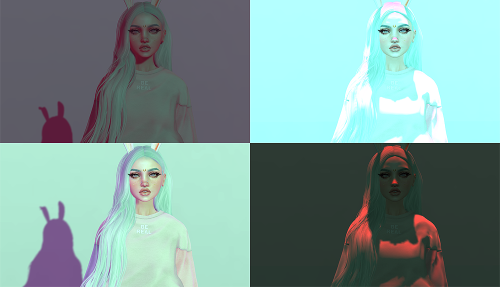
How to Install New Windlights & 5 Packs to Download!

Photo Credit : Naminaeko

For anyone who is even casually a photographer in Second Life, you know that windlights are what make the beautiful shadows, delicate glows, or bold contrast in a virtual photo. As Linden Labs explains in their wiki:

WindLight is the codename for Second Life’s atmospheric rendering system that enhances skies, lighting, and other graphical aspects of the environment.

Our viewers come packed with a good number of ‘out of the box’ windlights we can use and tweak. The easiest way to change these on a whim is to go to World > Environment Editor > Environment Settings > check Customize my Environment > and play with the ‘Fixed Sky’ dropdown. To make your own windlight, you can open up Phototools and play around with the settings until it fits the mood you’re after.

However, many of us don’t have the time necessary to painstakingly alter the many sliders that make up a perfect windlight. Why not leave it to the professionals? Luckily, we can install windlights from users who have gotten them down to a science.

Where to Download

We’ve picked 5 places with professional packs of windlights to download. To begin, just download the one’s that you like to a folder on your desktop. We’ll go over the rest in the next section!

  • Strawberry Singh – This page lists a number of different packs of Strawberry’s. Many to choose from!
  • Naminaeko – For download are both 2015 and 2017 packs of windlights.
  • Magick Thoughts – Magick even includes some water windlights which change the color & reflectiveness of SL water!
  • Shaedynlee – Not only are there windlights for download, but she explains how to create windlights of your own!
  • Steffy Ghost – Four whimsical and delicate windlights for a feminine feel.

How to Install

  1. First, shut down Second Life
  2. Unpack the zip files that you downloaded and get them ready in one folder.
  3. Drag your unzipped windlights into one of these folders: ** NOTE : If you are not using the Second Life viewer, you will need to replace the part in the filepath that says ‘Second Life’ with the viewer you are using.

Windows XP – C:\Documents and Settings\USERNAME\Application Data\SecondLife\user_settings\windlight\skies

Windows Vista & 7 – C:\Users\USERNAME\AppData\Roaming\SecondLife\user_settings\windlight\skies
or
C:\Program Files\SecondLifeViewer\app_settings\windlight\skies

Mac – use Go menu > Go to Folder and paste in: ~/Library/Application Support/SecondLife/user_settings/windlight/skies

That’s it! You’ll be able to open Second Life and see your windlights ready to use. Credit goes to Strawberry Singh for instructions and file paths.


Delilah Greyson (amoralie.triellis)
ZoHa Islands Blogger

Sinister Slaughters by Madpea Games – January 2017 Spotlight

If you’re looking for something fun to do in Second Life, look no further than MadPea Production’s newest game, Sinister Slaughters.

MadPea creates immersive experiences, puzzle games, mysteries, and hunts grid wide.Their newest release which opened on January 28th, 2017, boasts a whopping six hours of game play, and encourages you to bring along your friends and family to play along.

What’s the game about?

Via MadPea’s website – Five families across the country, all brutally slaughtered at the same time. Anyone, anywhere could be next. You’re the only one who can solve the mystery, using your psychic visions. To catch the killer, you’ll have to descend into madness in your mind’s eye. Are you brave enough to relive the horrors and stop these terrible crimes?

Is it scary?

MadPea’s has rated this game moderate for shocking surprises and blood. (I’m not much of a horror fan, but MadPea’s games have never been too scary for me.)

How much is it to play?

A HUD to gain access and play the game will cost you only 1,000 L$ – which equals less than $1 USD/hour of game play! I’d call that a bargain!

How long is it open? 

The closing date is TBD, but it should be open for a few months. Get in while you can! And before another game is released…

MadPea releases several new games per year, and keeps track of your achievements on their leader board. The higher your level, the more prizes you’ll win! There are opportunities each month through games, ‘expeaditions’, and other hunts to earn points toward your achievement score.

Where do I play?

Go play Sinister Slaughters HERE, and make sure to join the MadPea group in world to get game hints and learn about upcoming experiences.

Have fun! And be careful…


Delilah Greyson (amoralie.triellis)
ZoHa Islands Blogger

Social Media for Second Life – Finding Your Virtual Social Circle

If you’ve ever found yourself bored and idling within Second Life, you’ve likely realized (with much frustration) how difficult it can be to find friends or people with similar interests by simply hopping from grid to grid.

With social interactions at the center of this virtual world, it’s a wonder that making connections is so difficult. Second Life’s interface based attempt at connecting the world is a destination guide, which lets you browse popular places and easily teleport to those which are currently populated. This list is full of dance clubs and beautiful vistas – but leave out the ‘niche’ communities where many of us find our homes and communities.

That’s where social media comes in. External social media platforms such as Facebook and Twitter make connecting easier by letting us view a window into people around the grid via updates and information publicly shared. No need to worry about privacy concerns! Second Life social media users use their avatar’s name and photos to make accounts just like they would with their real life identity.

Of course, social media doesn’t take away the fear of having to make that first step at communication. It does give us many more opportunities to find people to talk to, places to go, brand new releases, and breaking news – something you just can’t find in world!

Ready to explore Second Life like you’ve never seen it before? Let’s see where people are talking…

Facebook

The most widely used social media platform is Facebook because of its ability to easily find and connect with other Second Life user and businesses.

A large amount of clothing stores, venues, events, and clubs have created pages for following which allows users to keep up to date with things that are happening now in world. If you’re ever bored, within a few scrolls you’ll see the release of a new item to check out – or a link to a blog post that features a new location to explore. Of course… messaging a new friend is only ONE click away. (Don’t be shy!)

Facebook is essentially the largest external hub of information from businesses and users alike. It’s a place to share art, exciting personal achievements, ask questions about how to do things within Second Life, post pictures of the avatar you’ve worked hard on, and keep up with old friends. With everyone sharing their stories, you’re bound to find a few that were meant to fit perfectly with yours.

Check out the Zoha Islands facebook page to see what it’s all about!

Disclaimer : One slight hiccup – Facebook does NOT condone the creation of accounts that are not your real life identity. Your account can be reported and removed for using your Second Life identity. While this fact is widely known, people still continue to use the platform and re-make accounts after they’ve been deleted simply because at the moment is the best social media platform for Second Life! The only way to stay ‘safe’ is to use your real life name. It is not mandatory (most people don’t) but advised to stay away from being reported.

Onlinker

In reaction to the accounts that were getting reported on Facebook, a new social media platform especially for Second Life avatars was created. Their mission statement reads…

OnLinker.com is safe and friendly social network for Second Life users. Make new friends, find romantic connections, share your photos, create events, write blogs and much more… all for free, and without the possibility of being banned for being ‘not real’. Because at OnLinker, Second Life is our focus.

With much of the same features as Facebook, OnLinker looks to be a promising source for social connections outside of Second Life. It is fairly new, so users are still migrating from Facebook and still using Facebook more heavily. But in anticipation for a harder crackdown on fake accounts in the future, it’s advised to hold an account here and start supporting OnLinker as your main social media platform.

Flickr

If you’re more interested in ‘viewing’ second life happenings rather than being an active social member, Flickr holds a large collection of photographs and artwork from Second Life users (at a much higher resolution than Facebook!). Stores and businesses also post photos of their latest happenings, so you can always stay up to date. Join groups within Flickr to become a member of your favorite communities!

Many contributors to Flicker post a link to their blog in the description of their photo. Bloggers tend to detail out which items they are wearing in their photograph, and sometimes give you the location of the shoot as well. This is a great way to find new things and get a feel for popular spots within Second Life! Its against Flickr’s policies to allow users to post directly to a money making source – so you won’t find MP links, but that’s what blogs are for!

Zoha Islands posts pictures on our Flickr page!

Twitter

Twitter is popular for 140 character updates that are published as quick quips or thoughts. Many people use twitter to share their photos or blog posts, and some use it just to think out loud.

While not the most popular of the social medias for Second Life, it can be useful for short attention spans and getting out streams of thoughts. It’s all about what resonates with how you take in information, and some people are just #TeamTwitter over Facebook!

Check out the Zoha Islands Twitter page to get a feel!

Plurk

Plurk is most similar to Twitter, and it’s more ‘Second Life focused’ companion. (Much like Onlinker is to Facebook).

It does have quite a few differences than Twitter while its the same in essence. The timeline scrolls horizontally rather than vertically, and posts can be much longer than 140 characters. Users are given a karma score so you can easily see who is active and weed out people who aren’t. It’s similar to Facebook in that people can respond to your posts and start a conversation.

Unique to Plurk is that you can post anonymously and people can still respond to your post – so you can get your feelings out while hiding.. And still remaining social!

We’ve got a Plurk too! Check the Zoha Islands Plurk Page.


While not a comprehensive list of all of the specialized platforms on which we can meet people, these social media sites can be a great help to finding like-minded communities and and events. They all work towards the goal of bringing us closer in world, and can enrich our Second Live’s through a deeper connection and capacity for immersion.

There’s something for everyone within Second Life – I hope these outlets help you find yours!

Delilah Greyson (amoralie.triellis)
ZoHa Islands Blogger

The Master Plan to Organize your SL Inventory and Keep it Clean!

One of the most difficult features for both newbies and veterans of Second Life to manage is the hard to navigate and terribly messy inventory system. Folders upon folders of outdated products, duplicates, lost items, and things you completely forgot you purchased are all hidden somewhere in the depths of folders you’ve accumulated over time.

But don’t worry! It doesn’t have to be a scary endeavor to manage. We’ve gathered some guidelines and secret tips to get your inventory freshened up and easy to navigate!

New year, new inventory. Find a sandbox, hop on your pose stand, and let’s get started!

** Note, we’ll be demonstrating these tips using Firestorm Viewer 5.0.1.52150 – your interface may look different, but the tips should still be applicable for many versions and viewers!

Create the Basic Folders

Start by outlining the basic structure of items you have. To begin, don’t get too detailed! Reorganize your items into their very general folder, then you can go back into each folder and make sub-categories later on.

  • Clothing
  • Shoes
  • Accessories
  • Body
  • Hair
  • Decorations
  • Furniture
  • Buildings & Structures
  • Animals
  • Cars & Riders
  • Textures
  • Poses
  • Animations & Dances
  • Holiday
  • Games
  • Scripts

Everyone’s inventory is very different. You’ll be able to customize this outline specific to you – and you’ll most certainly be adding folders as you go!

Again, make sure at this step you are only making the very general folders, then going back into each folder later to organize them further. This will help make a big task not so daunting to start!

Delete the Demos

Before you get started, do a quick inventory search for ‘DEMO’. Delete any demo folders and objects that may be hanging around – you can always go get another one for free if you really did need it! But chances are, they’re just taking up space.

Unpack Your Received Items  (& delete the boxes they came in!)

The first step I like to take before doing the real organizing is to empty the packages out of my ‘Received Objects’ folder. 9 times out of 10 when you purchase an item, the designer will send you a folder with one box. That box has the real goodies inside and is meant to be unpacked. Sometimes we unpack the item and forget to delete the folder and box it came in.

Go through your received items and see if you have any folders you already unpacked but forgot to delete. If you’re not sure, unpack it again. You can always delete the duplicates later.

If you find a Received Item that is not packaged and already unpacked within the folder, you can move that to one of your main folders now.

Unpack your Objects (& delete the boxes they came in!)

Once your received items folder is empty, we can move onto the Objects folder! This folder is also one of the places that unpacked items you purchase can end up. You can delete boxes here that you’ve already unpacked, or unpack them again to be sure.

You will have a lot of items in here that are not in a box. For instance if you picked up an item from a Gacha Mall that was already unpacked, it will end up here. We of course don’t want to delete the goodies, so place these items into the folders they belong in.

Woohoo! Another clean folder. We’re getting closer to being able to easily navigate our inventory.

Linked (Lost) Items

Looking for an item you SWEAR you had and know the name of, but can’t find for the life of you?

If you’ve ever accidentally forgot to pay rent and had your items sent back to you in a big cluster, you may have some items in your inventory that have a grid cube next to them like this:
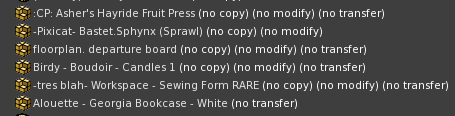
This is because you either picked up a bunch of items together, or someone returned items to you all at once in a group. Find a big open sandbox and rez this item. Everything will be rezzed just the way it was picked up, and one by one you can pick up those objects and they’ll be returned to where they belong.

There’s that platter of burritos I’ve been looking for…

Drag & Drop!

Now you’re ready for the big task, getting all of your objects and folders into their main category.

Personally, for a single item within a folder, I like to take out the item and delete the folder it came in. This just reduces the number of clicks to get me to what I want and removes all of the note cards and landmarks I have a thousand of.

Below are a couple of tips to help you do this…

Multiple Inventory Windows

After 8 years in SL I finally discovered this life saving inventory tip. Two inventory windows to drag and drop items from side to side.

Open up your inventory tab, and in the bottom left corner click on the gear. Choose ‘New Inventory Window’ – and viola!
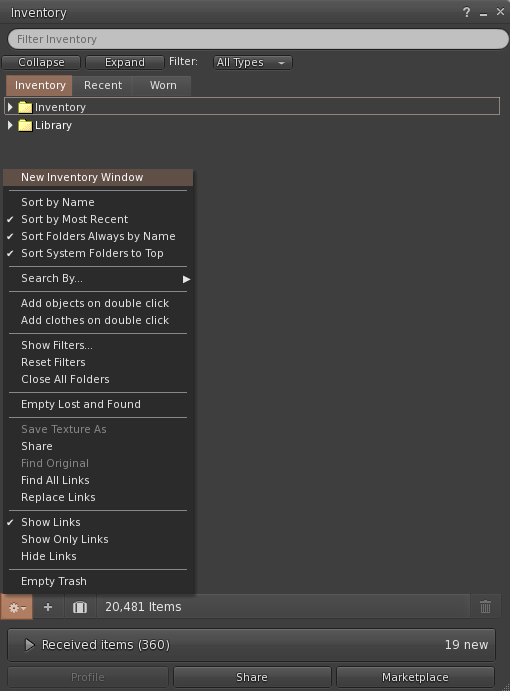
You now have two inventory windows to work with. I like to use one to keep open the folder I am working with, for instance ‘Shoes’. Then in the other, I search for all of the shoes I have to drag into the other window. Such a time and frustration saver!

Filter by Type

Useful for finding all of your Animations, Gestures, Landmarks, Scripts, ect is the filtering feature. In your inventory window click on the gear in the bottom left corner. Then click on ‘Show Filters…’. Here you can only click the checkbox of the item you want to find, for instance Gestures. Then, drag all of your gestures into the gestures folder to make digging around for them a whole lot easier!
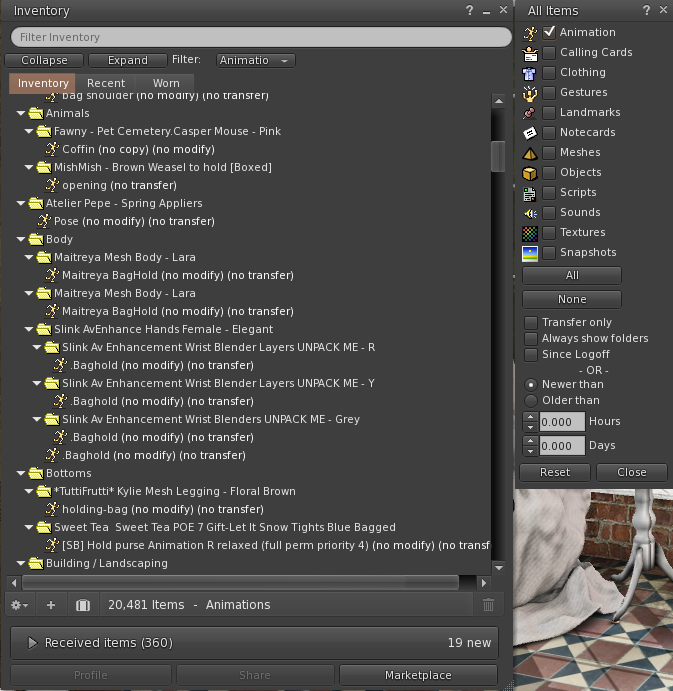
In this example, I would go through and delete all of the baghold animations as well. A good touch to a purchase! But I don’t need those anymore..

Delete those Pesky Duplicates

When an item is copy, you may find yourself placing and picking up multiple versions.
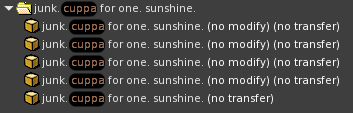
The item you want to keep is the one that is simply (transfer) delete all of the (no modify) (no transfer) items. You will still have a copy you can place a thousand times!

A good habit to get into is deleting copy items that you want to remove from your sim rather than picking them back up. You will still have the main item in inventory, but you don’t need more than that!

Delete Unneeded Sizes

Never going to use that size XXXXXS that your sweater came in? Delete it! Keep the one, or ones that you will use. This will help you know exactly which one to attach the next time you go to wear it! And remember, if you end up needing another size down the line, you can always redeliver.

Resist the Hoarding Temptation

If you don’t know what an item is, rez it or try it on. If it’s hideous and you would never want your friends to see it… it’s time to say goodbye.

Yes, I mean to that beautiful prim dress you purchased in the summer of 2010 and haven’t tried on since. You can do it, be strong.

Sub Category Organizing

Once you’ve finished organizing all of your items and folders into their main folder, you can go back in and organize them further if you wish. An example would be:

  • Hair
    • Short
    • Long
    • Updo
    • Occasion

Or

  • Hair
    • Blonde
      • Short
      • Long
      • Updo
      • Occasion
    • Brunette
    • Black
    • Red
    • Pastel

Make this specific to your items and inventory – organize however you want!

Upkeep

Now that the hard work is done and you’ve got a squeaky clean inventory, make sure to keep it clean by:

  • Deleting the boxes and folders that you’re goodies came in
  • Deleting demos after you’ve tried them out
  • Organizing into your main folders as often as possible
  • Unpacking linked/lost items as soon as  you see them
  • Deleting copies rather than keeping multiple
  • Deleting sizes of clothing you’ll never use
  • Deleting old outdated items that you’ll never use again

Managing your inventory may seem like a daunting task, but the time it will take you to do it will save you just as much when you go looking for that item you have in mind!

Take it in small steps and work on it day by day. You may just find some hidden treasures you forgot about along the way!

Good luck!

Delilah Greyson (amoralie.triellis)
ZoHa Islands Blogger

My 3 Virtual Predictions For 2017

Happy 2017 everyone! In spirit of a new year bringing us all a fresh start, I’m going to share my 3 predictions that will impact our beautiful, virtual space.
Disclaimer: My views are my own and not that of ZoHa Islands.


1: The Year Of Bento Will Rage On

Bento was finally released late in 2016, which caused people to clamor (mainly) for Bento-friendly mesh heads. We’ve only scraped the tip of the iceberg, folks. This is going to cause an influx of progressive creations (much like how Vista was already on top of their game with Bento-friendly mesh hands) that will test the full potential of our new rig points. I also think this will lead to mesh clothing creators dabbling more in animated clothing…..skirts that flow more especially. It’s going to bust open a lot of doors creatively that will have our best and brightest pushing the envelope yet again.


2: Project Sansar Will Be Anti-Climatic

Listen, Project Sansar is an amazing concept, but last year people were legitimately panicking about it causing the eventual demise of Second Life. For what it is and is expected to be, this should be one of the most hyped-up VR experiences out there. Hell, I’ve already pre-ordered games that aren’t due out for a few more months because they were hyped up just right. But that’s the thing: it’s like they haven’t really bother to whet people’s appetites OUTSIDE of those who are already invested in Second Life. They’re pulling in Second Life creators to help generate things and having Second Life users beta test, but if we weren’t in Second Life what are the odds we would have even known this was coming out? From my perspective it’s been a marketing fail, especially since they’re mainly focusing on leveraging Second Life users to be able to get the word out that it’s coming. To anyone not already in our little universe it’s a “virtual” unknown, spare some folks that are always on the lookout for such things.

Originally it was stated that Sansar would have an early 2017 release, but I can’t see that happening. Maybe they have more to work on than anticipated and they’re keeping it low key until they know it’s solid or maybe it’s a genuine oversight. But pandering to the pre-existing Second Life community doesn’t even make sense, especially if the goal is to branch out and reel some fresh blood in.

It also doesn’t help that Oculus Rift was heavily promoted as the go-to equipment for this upcoming experience and then Oculus released the headset for far more than they had been advertising prior to. So, they’re banking on existing Second Life people to want to also invest in Sansar, but it’s incorporating equipment that is likely outside of a price point that the average user is going to be willing to spend to be on board. With the backlash of people that did not want to be involved because they felt Sansar would be lecherous, the likelihood of Second Life users “jumping ship” is super slim, and the monthly fee may deter most. So, unless these guys intend to ramp up the advertising and make Sansar known more to the general public ahead of time, it’s going to have a sluggish start.


3. Linden Labs Will Show More Love To SL

LL surprised many of us with the server upgrades (and eventual prim increases) which was closely followed by the full release of Bento. The doomsayers could rejoice, as this was a clear indication of them still investing in Second Life (whereas last year it was “so certain” that Second Life would crumble. But the reality is that if Sansar flops, they’re going to be hurting to ensure that Second Life is still supported well enough to generate the income that it has been. Some might see the improvements as a protective measure, but it’s smart investing. Second Life has a large following still and has the potential to draw new people in every day. They’re far from barely generating income for LL. In a sense, without Second Life, LL would be hard pressed to survive the Sansar experiment without that safety net (should it not do well).


What do you think 2017 will bring for our virtual space?


Bria Oceanside

ZoHa Blogger/Social Media

A Look Back at 2016 in Second Life

A Look Back : 2016 in Second Life

Another year has come and gone, and just like the real world, Second Life has seen some changing tide, especially to its technology. As we wrap up 2016, let’s take a moment to reflect on just a few of the game-changing breakthroughs (and breakdowns) we’ve seen in the past 12 months.

Project Bento Release

Perhaps the most groundbreaking and anticipated release of the year was #Bento – which allows the Second Life Avatar a much more sophisticated customization and movement of the hands and face, and the addition of wing and tail bones.

The Bento announcement came to the main grid on May 31st, 2016 – and has been most recently made available for viewing through the Bento Firestorm Release on December 14th.

Catwa was among the first to release a Bento head, followed closely by Akeruka, Altamura, LeLutka, and a ToddleeDoo Bento head for child avatars. Vista Animations is leading the way in animated hands, and wings by FATEplay.

This new capacity for avatar animations has created much more life-like experiences, further paving the way through ‘uncanny valley’, or a very close resemblance to real life.

Prim Increases

Second Life’s technology finally caught up with its demand, announcing significant prim increases on November 3rd for landowners – at the same rate they were paying before.

Full Regions (Mainland) 22,500
Private estates: 20,000 OR 30,000 for an additional US $30 a month
Homesteads (Mainland and private): 5,000

Visual Outfits Browser

On September 15th the Second Life Viewer added a new feature called ‘Visual Outfits Browser’ which allows you to assign photos of your outfit to your outfits collection, making getting dressed a whole lot easier. On December 14th, Firestorm added this feature to their viewer as well.

New Marketplace Search

On August 15th, Linden Labs announced the launch of the new Marketplace Search. Old infrastructure was swapped out to make way for an advanced system that will ‘learn’ over time how people search in order to get you to your desired product faster. An additional improvement is the dropdown that appears to make suggestions as you type, saving time by suggesting the most relevant search results before clicking ‘go’.

New Starter Avatars

In 2015, Second Life revamped the outdated starter avatars with a new set of mesh options to choose from. In 2016, 10 new avatars were added to the collection in a ‘fantasy’ theme. Now new users can choose between sci-fi, steampunk, and gothic identities (to name a few).

The Rise of Virtual Reality

With the release of the two virtual reality headsets paving the way – Oculus on March 28th, 2016 and Vive on April 5th, 2016, the future for how we experience virtual worlds is on the brink of a major change.

From the creators of Second Life, a new platform called Sansar is in development and expected to release in 2017 (contrary to the hopes that this would be released at the end of 2016). Some of Second Life’s top creators have been exclusively invited to give the new platform testing. Talk has Second Lifers concerned that it will cannibalize the community and lead to Second Life’s downfall. But don’t worry! These platforms will be entirely different, and those who love Second Life for what it is will not find the same experience in Sansar – at least right away.

JellyDolls

One day we all logged on to see our friends and loved ones barely distinguishable and the color of jelly beans. The reason was due to an initiative by Linden Labs, released in an update to the Second Life Viewer, to derender high complexity avatars to help unsuspecting victims still be able to navigate through crowded places with less effect on their quality.

Panoramic Video & 360 Photo

Linden Labs released a supplementary viewer on October 26th that allows you to take 360 viewers in a single click, capturing an entire panoramic scene.

An additional module for your existing viewer was released for purchase on the marketplace as well.

The Passing of Latif Khalifa

Latif, the creator of the popular text view Radegast, passed away after battling an illness in March of 2016. His contributions to Second Life spanned content and third party viewer creation, having used his talent on projects such as OpenSimulator, Singularity, Replex, in addition to Radegast. He will be remembered by many for his work and love for the Second Life and Virtual World community.

Happy Holidays!
Delilah Greyson (amoralie.triellis)
ZoHa Islands Blogger