Linden Lab Unveils Dio

Linden Lab, the creators of Second Life, are unveiling the beta of their latest project – a website called Dio. Dio is a simple site that blends website design and social web, where you can create an explorable space that people can visit, move around, and leave comments in. It works by allowing you to upload photos and add actions, those actions can result in other actions, or even an entire chain of events – making it user interactive and quite an adventure.  You can leave interactive advertising, play games, and even eventually make money while doing it according to Linden Labs.

Want to read more and explore all of the perks and cool features of Dio?  To read more on the website visit – What is Dio ?

As of yesterday, it’s available to beta users to design, play, and share –

ZoHa Islands in Dio
(You need to register first to be able to view this page)

Linden Lab Dio Press Release – January 29th – 2013
Linden Lab introduces dio – a new shared creative space

Official Dio Website
Dio | Linden Lab

Dio Video Tutorials
DioPlaces – YouTube

Forbes Blog Post
Exclusive: Linden Lab’s ‘dio’ to Let You Gamify Your Media for Fun and (Eventually) Profit

QuickTips: Second Life Video Tutorials for Beginners

A new video was uploaded by Torley Linden on January 24th, 2013 on customizing your appearance. 

This new quick tip video is aimed at new residents joining Second Life explaining all of the basic editing appearance functions.  We know at times getting started in Second Life can be a bit difficult for newcomers which is why these “Quick Tips” videos are a wonderful idea – be sure to look for them over the next few weeks.  So whether you have a new friend joining SL…or are a new user yourself..these tips and tricks can be quite valuable.

The Second Life Blog released this info here:

Introducing QuickTips – Second Life Video Tutorials for Beginners

by Community Manager Linden Lab 01-24-2013 04:25 PM – edited 01-24-2013 04:25 PM

New to Second Life? There’s so much to see and do in this vast virtual world — but getting started can be a bit intimidating for some newcomers. That’s why we’ve put together a new series of quick and easy tutorials to help.

Over the next few weeks, you’ll see several new “QuickTips” clips that are designed to help new and existing users learn the basics of Second Life. Forthcoming tutorial clips will help teach the basics of shopping, socializing, connecting with communities, finding interesting places and more.

The first video tutorial in this new series focuses on customizing your appearance in Second Life. One of the first things most Second Life users do upon arriving inworld is to personalize their digital identity to reflect their own style.

The above video only scratches the surface of avatar personalization options. Many people wish to further personalize their avatar’s look by shopping for unique clothing, hair and fashion accessories in Residents’ shops within Second Life. You can also browse on the Web for avatars and fashions at our shopping site SL Marketplace.

For more tips on controlling your avatar appearance, visit our Knowledge Base.

More SL related video’s can be found on the Second Life You Tube Channel.

One Billion Rising in Second Life – February 14th – Save the Date!

ZoHa Islands would like to take this opportunity to spread the word about this new event  on Thursday, the 14th February 2013 called One Billion Rising in Second Life.   On February 14, 2013, for 24 hours starting at midnight SL Time, Second Life residents will join with activists around the world in a spectacular 24-hour dance event for ONE BILLION RISING, the largest day of action in the history of V-Day, the global activist movement to end violence against women and girls.  The event sounds fantastic & should be an exceptionally and equally amazing turnout – and for such a wonderful cause.  For More info on this cause and how to support in RL please visit The V-Day Official Website.

There will be a giant 4 sim stage where over 200 avatars can enjoy the live music and fantastic art/info exhibits.

1br-logo-web

Official Press Release –>>

“Come and dance! One Billion Rising in Second Life!

SECOND LIFE® RESIDENTS JOIN GLOBAL CAMPAIGN “ONE BILLION RISING” TO STOP VIOLENCE AGAINST WOMEN AND GIRLS

On February 14, 2013, for 24 hours starting at midnight Pacific Standard Time, Second Life residents will join with activists around the world in a spectacular 24-hour dance event for ONE BILLION RISING, the largest day of action in the history of V-Day, the global activist movement to end violence against women and girls.

ONE BILLION RISING began as a call to action based on the staggering statistic that 1 in 3 women on the planet will be beaten or raped during her lifetime. With the world population at 7 billion, this adds up to more than ONE BILLION WOMEN AND GIRLS. On February 14, 2013, men and women in Second Life will join activists, writers, thinkers, celebrities, and people across the world to Walk, Dance, and Rise as a show of unity, individual strength, and the need for change.

The Second Life event will feature a four-region stage where 200 people can dance together, surrounded by an area of art installations and informational exhibits. A variety of performers will play over the 24-hour period, enabling people all over the world to attend this virtual event no matter their timezone. The regions will have a General maturity rating to allow all residents an opportunity to participate. Pictures are welcome on the event’s Flickr group.

The objective of the event is to raise awareness, not to raise funds; however, information about real-world organisations will be available for those wishing to donate.

One Billion Rising in Second Life is sponsored by: Alchemy Immortalis; Bits and Bobs Animations; Cheeky Pea; The Domineaux Effect; Dutchie; Galland Homes; Garden of Dreams; Gos Boutique; Gwen Carillon Designs/Serenite; Heart Garden Centre; Kaerri; MadPea; Maven Homes; Meshworx; Prime; and Spargel and Shine. In-kind sponsors are: CaLLie CLine; Fruit Islands; KittyCatS!; L’Aize Days and Prim Perfect Publications.

For more information:
Our blog: http://onebillionrisingsl.wordpress.com/
Our webpage at One Billion Rising: http://onebillionrising.org/page/event/detail/startarising/wd8
Our Second Life Group: One Billion Rising
Our Facebook Page: https://www.facebook.com/pages/One-Billion-Rising/493344827375934?ref=hl
Our Twitter Stream: https://twitter.com/OBRinSL
Our Flickr Group: http://www.flickr.com/groups/2169739@N23/

# # #

About One Billion Rising
One in three women on the planet is raped or beaten in her lifetime. That is ONE BILLION WOMEN violated. One billion daughters, mothers, grandmothers, sisters, lovers and friends. On February 14, 2013, V-Day’s 15th Anniversary, we are inviting ONE BILLION women and those who love them to WALK OUT, DANCE, RISE UP, and DEMAND an end to this violence. ONE BILLION RISING will move the earth, activating women and men to dance across every country.

For more information go to http://www.onebillionrising.org/.

About V-Day
V-Day is a global activist movement to end violence against women and girls that raises funds and awareness through benefit productions of Playwright/Founder Eve Ensler’s award winning play The Vagina Monologues and other artistic works. In 2012, over 5,800 V-Day benefit events took place produced by volunteer activists in the U.S. and around the world, educating millions of people about the reality of violence against women and girls. To date, the V-Day movement has raised over $90 million and educated millions about the issue of violence against women and the efforts to end it, crafted international educational, media and PSA campaigns, reopened shelters, and funded over 14,000 community-based anti-violence programs and safe houses in Democratic Republic of Congo, Haiti, Kenya, South Dakota, Egypt and Iraq. Over 300 million people have seen a V-Day benefit event in their community.

For more information go to http://www.vday.org/. “

Home Buying & Setup In Second Life

Today’s Posting will focus primarily on our Residential side.

So say….you’ve just purchased this lovely piece of land or have a place you’ve had for a while and just need a new look, maybe a fresh start after that rough break up? – or just like me and swap out houses every month cause you just like the change of scenery.  Today I’ll help provide you with some tips and tricks with placing your new home, where to find the best homes (Listed at the bottom of the posting) – for your budget and how to eliminate those pesky lag causing & covenant violating rez scripts.

First things first.  When purchasing a home or land – there ar a few things to keep in mind,  Footprint being one of the major ones & Prim Count.  If you purchase a home that is 64m x 64m – sure it may fit on a 4096sqm parcel but it leaves absolutely no room so unless you want your home touching your neighbors – this is not a good idea.  Rules of thumb is to leave at least 10m of breathing room around your home if it is not located in the sky – in the sky it doesn’t matter too much as you have so many different elevations to choose from.  The room around allows for nice landscaping, natural privacy options and a good overall experience for you and your neighbors that makes you actually want to spend time at your home and show it off to your friends.  Rather than that pesky 15-20m privacy wall….why not use natural plot dividers or trees? Many stores offer nice waterfalls and plot dividers at low cost to customers.   As for prim count – keep in mind things like…is this home pre furnished?  How many prims will you need to landscape and decorate?  Also allow yourself room to rez and open packages.

Land Footprints on Standard Pull Prim Sims are as Follows:

  • 1024 sqm – 32m x 32m – 234 Prims
  • 2048 sqm – 32m x 64m – 468 Prims
  • 3072 sqm – 48m x 64m – 703 Prims
  • 4096 sqm – 64m x 64m- 937 Prims (1/16 Region)
  • 6144 sqm – 64m x 96m – 1406 Prims
  • 8192 sqm – 64m x 128m – 1875 Prims (1/8 Region)
  • 16384 sqm – 128m x 128m – 3750 Prims ( 1/4 Region)
  • 32768 sqm – 128m x 256m – 7500 Prims ( Half Region)
  • 65536 sqm – 256m x 256m – 15000 Prims (Full Region)

Land Footprints on Homestead Sims are as Follows:

  • 1/8 Homestead – 8192 sqm – 64m x 128m – 468 Prims
  • 1/4 Homestead – 16384 sqm – 128m x 128m – 937 Prims
  • 3/8 Homestead – 24576 sqm – 128m x 192m – 1406 Prims
  • 1/2 Homestead – 32768 sqm – 128m x 256m – 1875 Prims
  • Full Homestead – 65536 sqm – 256m x 256m – 3750 Prims

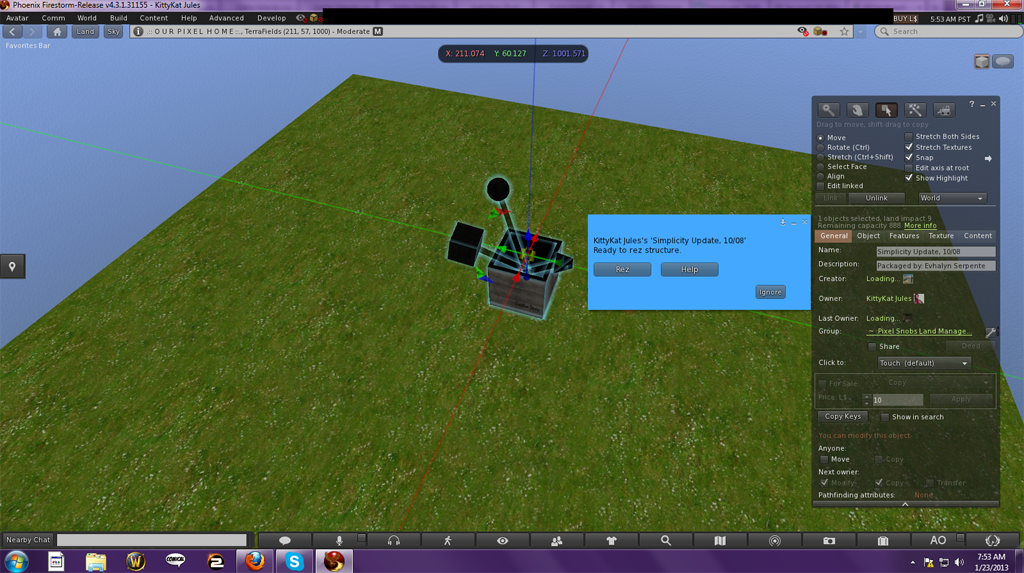
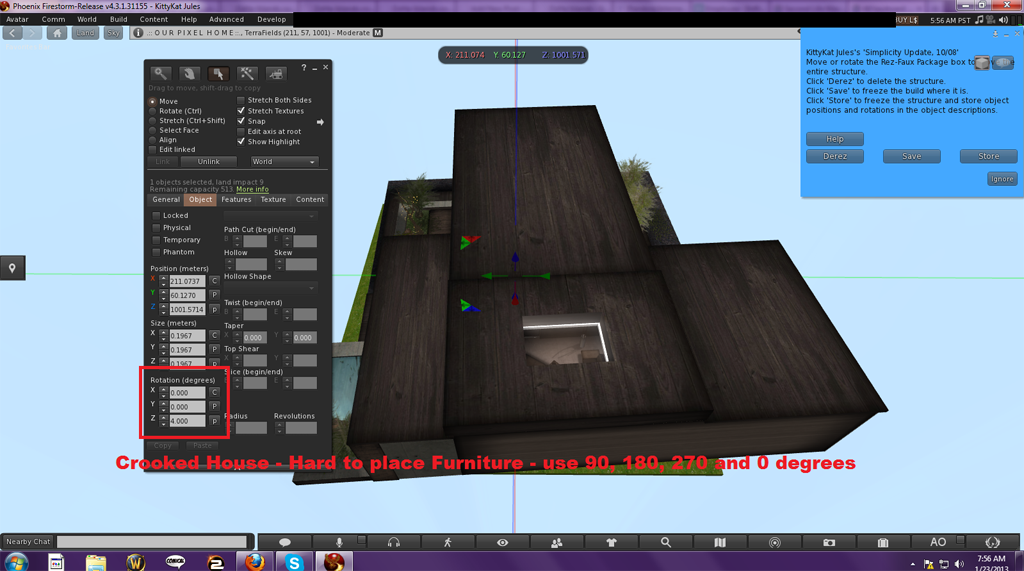
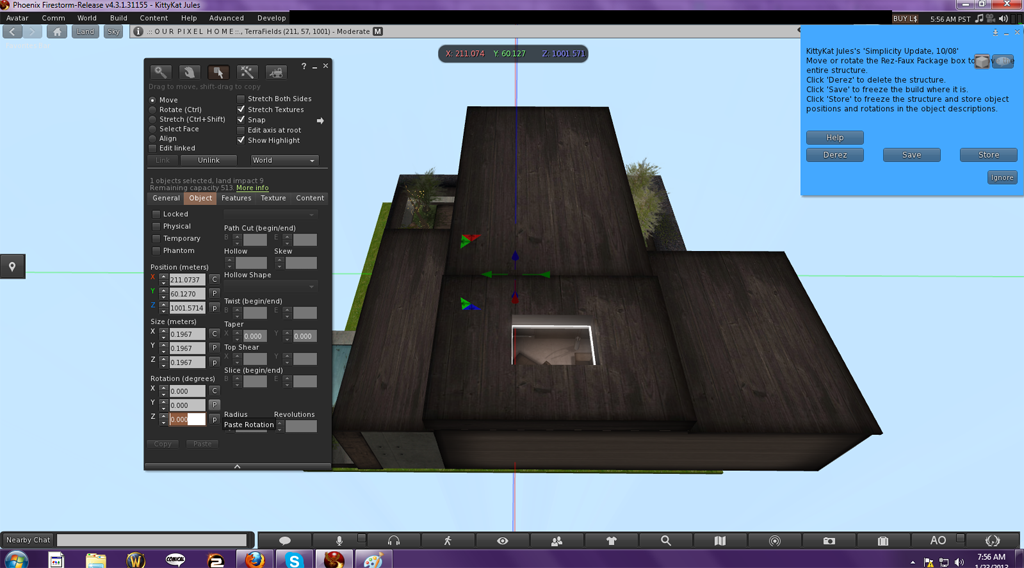
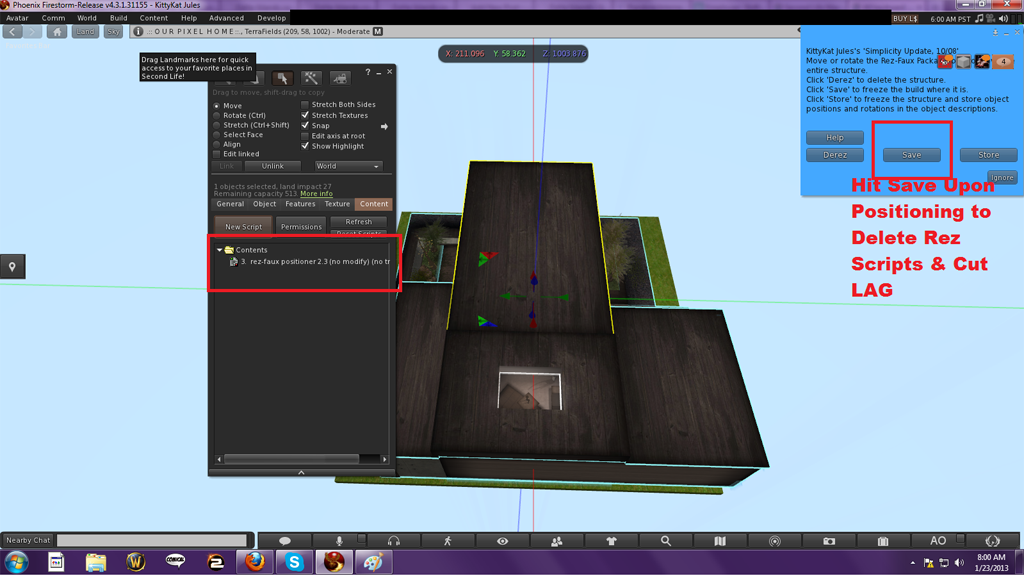
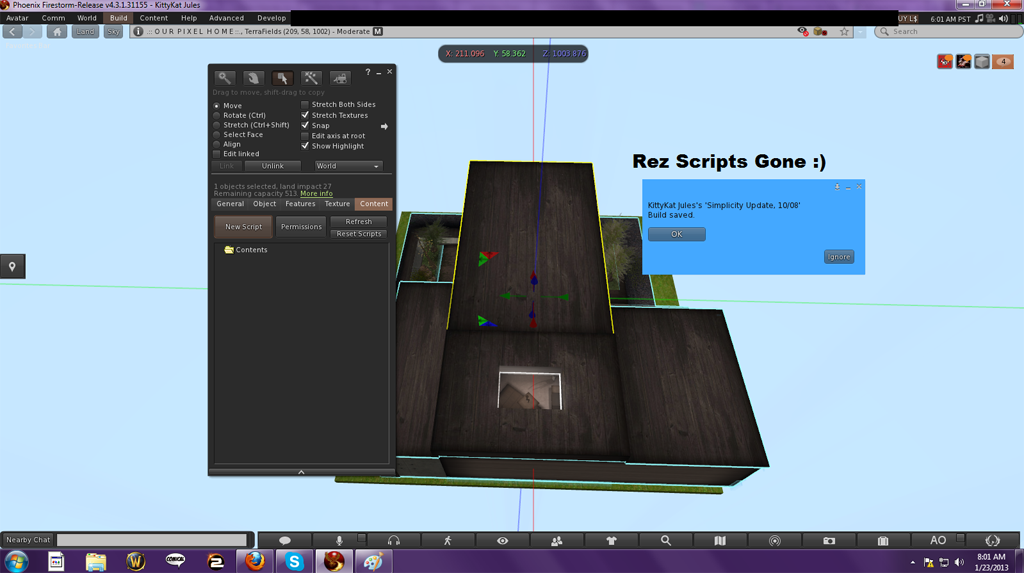
Secondly – now you’ve found your home, its time to rez it.  Take out your rez box….position – click and rez.  Next say you need to rotate it facing another direction right?  Rules of thumb – use right angles (0°, 90°, 180° or 270°) to make moving and positioning things in your new pad a breeze.  Please see the photos below for info on how to rotate properly & remove LAG causing rez scripts:

Rez Box 1

Rez Box 2

Rez Box 3

Rez Box 4

Rez Box 5

Prefabs – Homes & Builds

Hope this helps answer some questions or at least gives you all some wonderful new home buying options. 

Have a great week Zoha Islands – and thanks for reading!

PS:
Please contact KittyKat Jules if you are one of our residents and want to have your Home/Prefab Building business listed here.

Understanding your Statistics Menu – Help Improve your Region’s Performance

Hello ZoHa Islands.

This week we are going to cover the Statistics Menu (Ctrl+Shift+1) .  We will be touching base on the most important sections of the Statistics Menu for you and what the numbers actually mean and when to alert an Estate Manager. Time to sit back, grab a drink and read on.

While standing on your land, select (Ctrl+Shift+1). This can be a bit overwhelming, so we’ll guide you through the relevant parts here.

Note: Sim stands for “simulator” and is another name for “region.”

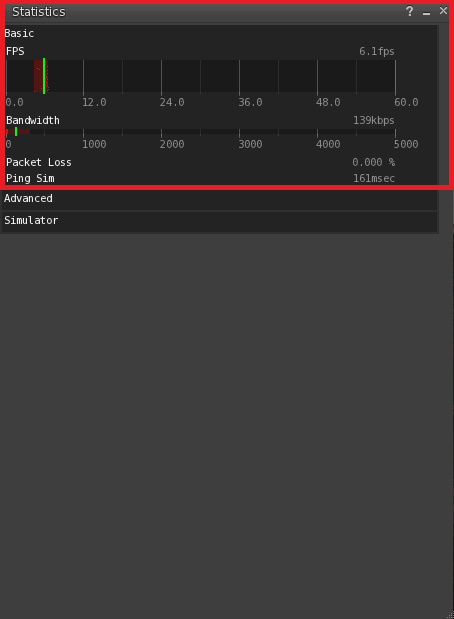
Basic – Click on the word Basic to hide or display this panel.

Displays basic information about your Second Life performance.

FPS: The number of times per second your computer is redrawing (or refreshing) what’s on the screen. Higher numbers are better. A framerate between 15-30 frames per second (FPS) is about as smooth as broadcast television.

Bandwidth: How much data is being transferred between your computer and the Second Life world. This number varies wildly depending on what bandwidth settings you’ve used, where you are inworld, what’s going on, and whether you’re still loading some things (objects/textures/etc) that are in your field of view. If bandwidth is 0kbps, something may be wrong (you may be partially disconnected).

Packet Loss: The amount of data being lost as it travels between your computer and the server. Any nonzero packet loss is bad; packetloss above 10% is very bad. Packet loss might be caused by a dying server (in which case everyone in the region would be experiencing it), a bad connection between you and Second Life (possibly a bad router between your ISP and Second Life, or congestion at your ISP), or problems on your local network (wireless networking, or internet security or firewall software on your computer).

Ping Sim: How long it takes data to go from your computer to the region you’re currently in. This is largely dependent on your connection to the Internet.
Stats Bar 1

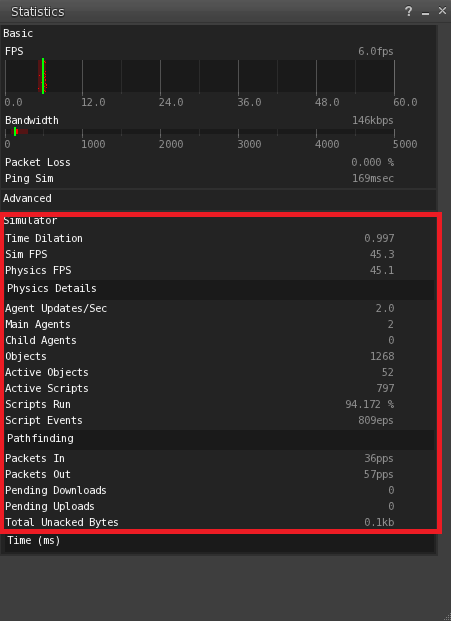
Simulator – Click on the word Simulator to hide or display this panel.

Displays statistics for the region (simulator) you’re currently in.

NOTE: an “agent” is either a user in a given region (a “main agent”) or a user in a neighboring region (a “child agent”). Any user who can see objects inside a simulator region increases the load on that simulator. The nominal values below are for simulators running on a single simulator per CPU. On other simulators (such as water simulators), these number will be different.

Time Dilation – The physics simulation rate relative to realtime. 1.0 means that the simulator is running at full speed; 0.5 means that physics are running at half-speed.

Sim FPS – The simulator frame rate. This should now always be the same as the physics frame rate — 45.0 when things are running well.

To interpret the Sim FPS performance of your region:

  • 45 FPS: The highest possible value. No action necessary.
  • 35 – 44 FPS: This is quite good; you don’t need to tune if it never goes below 35 FPS.
  • 20 – 35 FPS: This is slow, and should be noticeable. Adjustment is needed to improve your region’s performance.
  • 10 – 20 FPS: This is not so great.
  • 0 – 10 FPS: This is pretty much terrible.

If your performance of your region is consistently over 35 FPS at its busiest time, you can stop reading here. Fortunately, most regions are above 35 FPS most of the time.

Physics FPS – The frame rate at which the physics engine is running. This should normally be at or near 45.0.

Agent Updates/Sec – The rate at which agents on this simulator are being updated. Normally 20 updates a second, this will decrease if the simulator has a large number of agents on it.

Main Agents – The number of agents (users) who are on this simulator.
If this is exceptionally high, it is likely the prime cause of this region’s slow FPS. Avatars contain attachments and they Teleport in and out – each time affecting the regions performance slightly.

Child Agents – The Child Agents line displays the number of avatars outside your region that can see into it, which can also slow your region down if it’s a significant number. (This happens only on connected sims/regions)

Objects – The total number of primitives on the simulator. This value does not include primitives being worn as attachments.

Active Objects – The number of objects containing active scripts on the simulator. This value does not include scripts inside attachments, unless the attachment wearer is sitting on a scripted object.

Active Scripts – The number of running scripts that are currently on the simulator, including scripts attached to agents and objects.

Script Perf – Number of LSL opcodes being executed a second by the simulator. Note that this is the number of ACTUAL instructions executed in the last second, not the theoretical maximum opcodes/second. If your simulator is not running very many scripts, this number will be low even if performance is good.

Packets In – UDP packets being received by the simulator.

Packets Out – UDP packets being sent by the simulator.

Pending Downloads – Number of asset downloads to the simulator that are pending. If this is greater than 1, this means that you may see delays in viewing notecards or scripts, and rezzing objects.

Pending Uploads – Number of current uploads of asset data pending. If this number is non-zero, this means that there may be performance issues when attempting to teleport.

Total Unacked Bytes – The size of the reliable packet data sitting on the server waiting to be acknowledged. A large number may indicate a thin pipe or other possible problems between the viewer and the sim.
Stats Bar 2

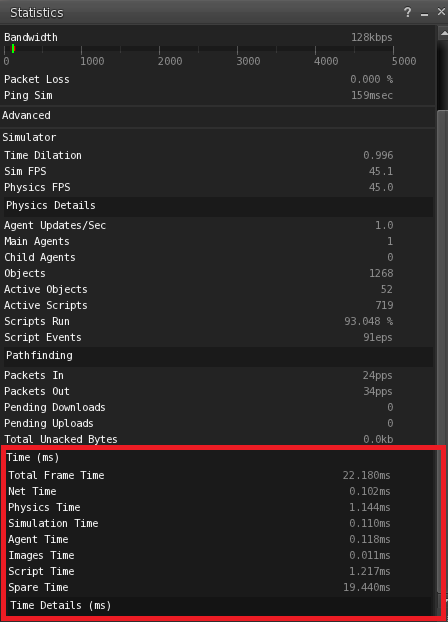
Time – Click Time to hide or display this panel.

The following are the different times listed in the Time section of the Statistics bar.

Total Frame Time – The sum of all time values listed below it, this measures how much time it takes the simulator to run everything that the simulator is trying to do each frame.

  • < 22 ms - The simulator is healthy, everything is running as fast as it can, and more scripts can be added without reducing the performance of individual scripts.
  • approx. 22 ms – The simulator is healthy, but there are probably a lot of scripts and agents on the simulator, meaning that script execution is being slowed down in order to maintain the simulator frame rate.
  • > 22 ms – The simulator is experiencing severe load, either due to physics or a large number of agents, such that even by slowing down script execution it is impossible to compensate. The simulator frame rate has been reduced as a result.

Net Time: The amount of time spent responding to incoming network data.

Sim Time (Physics): The amount of time that frame spent running physics simulations. In general, this should be less than 5 milliseconds.
If this value is over 5 milliseconds this is when I get the call to restart a region which is an iffy temporary fix at best. This is when the ZoHa Estates Managers come into play and notify the owners of the scripts or return the objects if they are significantly impacting the performance and immediate action needs to take place.

Sim Time (Other): The amount of time that frame spent running other simulations (agent movement, weather simulation, etc.)

Agent Time: The amount of time spent updating and transmitting object data to the agents.

Images Time: The amount of time spent updating and transmitting image data to the agents.

Script Time: The amount of time spent running scripts.

Spare Time: The amount of time that is available or unused. (Higher the better…when this dips to a lower number your region may be experiencing lag)
Stats Bar 3

Inefficient, poorly written or very busy scripts in your region can also slow it down.

So what can you do to help?

Lets cover a few things to help sim performance as a whole –
Once you know which scripts are consuming your region’s resources, you can remove, replace or optimize them. Also, note that reducing the total number of scripts in your region can improve performance. You can ask for us to test your region but from now on top scripts will be addressed as follows. When we test a sim region we will send a message via NC on which scripts are lagging out the region to give you a chance to either remove or optimize them. If you do not fix this issue we may return the object in question! Usually these are REZ scripts – which are scripts in your builds that remain in each linkset if you do not save/freeze your builds after rezzing.  Because we want these regions to run at top performance this is necessary and will be enforced! Remember its not fair to make the whole region pay for one person’s faulty items.

Examples of problematic scripts include:

  • Scripts that are constantly active without sleeping; for example: Sensor scripts with less than a few-second sleep interval.
  • Temp-rezzer scripts that allow a slightly larger number of prims at the expense of region performance.  << big lag monsters

Physical objects can potentially slow your region down. Specifically, physical objects that are often moving and collide with each other can contribute significantly to the time your region takes to perform the physics calculations. In the Statistics Bar, the Sim Time use ctrl + shift + 1 (Physics) line shows how many milliseconds your physics calculations are taking. If this value is over 4 milliseconds, then it may be worth check to see if this can be reduced. Again you will be sent a warning on these objects and be asked to correct them or they will be removed.

Remove Excessive Large Textures –
Excessive use of large textures can slow down a region. In general, it’s a good idea to avoid using textures greater than 512×512 pixels. In the Statistics Bar, the Images Time line tells you how many milliseconds the handling of your region’s images is taking. If this value is over 2 milliseconds, it may be worth checking to see if it can be reduced: When a person’s avatar views a large image or numerous smaller images for the first time since entering the region, they’ll automatically download the image to their Second Life viewer. If a number of avatars are doing this simultaneously, a significant load is created on your region, slowing down its FPS. If you can’t remove these large textures, the following strategies might be useful for increasing your region’s performance:

  • Reducing the number of unique textures
  • Reducing the size of textures
  • Reducing the resolution of textures
  • Optimize Scripted Texture-Changing Objects

Scripted objects that change textures can also slow down a region. Each time a new texture is displayed, it must be downloaded to each avatar looking at the object. If you can’t remove these objects, then reducing the number and size of unique textures in these objects can increase your region’s performance

Large numbers of objects will slow your region down, especially if they’re of any of the following types:

  • Moving
  • Rotating
  • Flashing
  • Scripted
  • Shape-changing sculpties

Reduce Visitor Attachments:
While this is harder to do, some regions have been able to see some improvements by having visitors remove attachments, especially high-prim or heavily scripted ones.

Region Optimizations for Improved Viewer Performance

The following region items can slow down viewer performance:

  • Large or numerous textures, when an avatar first comes within sight of them
  • Overuse of sculpted prims, twisted tori, and other geometrically complex objects.
  • Particle effects (which includes bling and poofers).

Keep in mind some of your visitors may have slow graphics cards or PCs.
<---- In Most Cases, you figure the average SL user buys an off the shelf mid grade PC. Well I hope this helps and I hope you will do your part in making your region run top performance. And if you still find your region is lagging you could always try CTRL + Q, this seems to help me when I'm frustrated with SL. *whistles innocently* Have a great week ZoHa Islands!

Around the Estate – An Exceptional Build

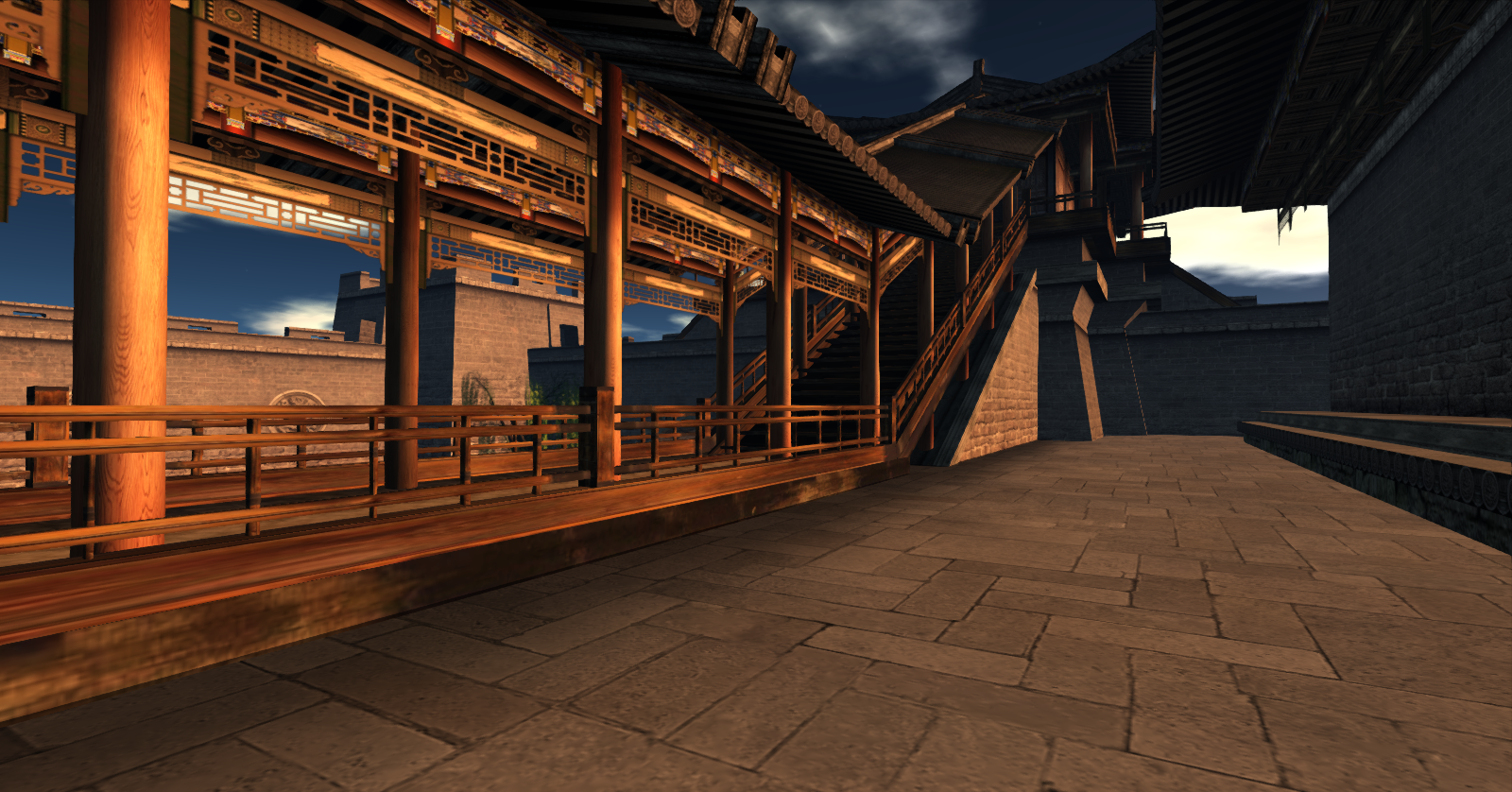
So during the terminal & system maintenance I was given the opportunity to visit all over the estate.  A few places really stuck out to me, this being one of them.  The architectural design, the amazing texture work, and the overall layout is absolutely stunning.  The layout is like stepping foot inside a real life masterpiece brought into Second Life.  A fantastic find for a photo shoot and not to mention some seriously gorgeous skins in the store here as well.  This place is definitely worth a look whether its to snap a few photos for memories sake, a blog posting of your very own or to take your favorite SL guy for a skin update, or even just to treat yourself.

Adrian_001

Xiaoduo Abbot is the creator behind such beauty and the founder of Jomo.  Jomo’s products consist of high quality skins, hairbases, prim feet, tattoos, clothing, full avatars, clothing, and specialty wear.  His works can be found In World or Via Marketplace (although MP is not complete with skins and such).  You can demo the Jomo Mesh Men’s Feet – no excuse to have the dreaded noob feet of SL any longer boys!  The product comes complete with five models, color adjustment HUD & ankle colors are transitional, matching is a breeze!

In World Location

Marketplace Store

Adrian_002 Adrian_004 nv1

This avatar pictures above comes in both Male and Female variation.  The avatar comes complete with a Tinting HUD for body, brain, eyelashes,lips and fingernails.  Can be adjusted to any color you want – ready for you with dozens of optional colors or select your very own shade.  Headpiece is also optional – you can leave it open with the brain exposed inside.  Please try Demos of both products prior to purchase.

C

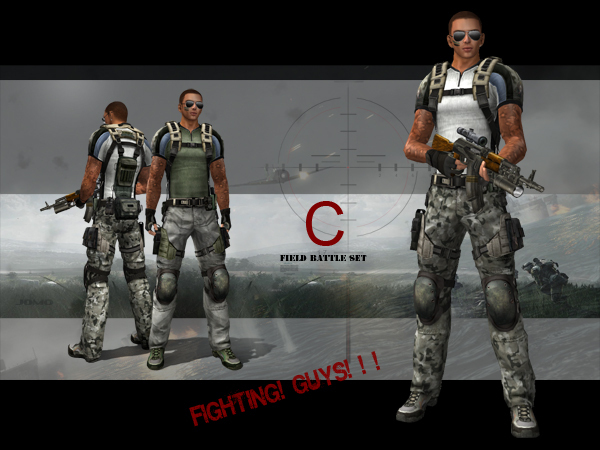
The ensemble above is perfect for any Military or Combat Roleplay in your Sl – there are several variations of this outfit features different camouflage options and clothing combinations.

Please try the demos prior to purchase – there are 3 types available on Marketplace.

Adrian_005

Snapshot_002